
ChatGPT Shopping ResearchBest Practices Guide
Learn how to optimize your product data for ChatGPT Search using Generative Engine Optimization (GEO) best practices. This guide is updated twice a year to reflect OpenAI’s latest product data specifications and guidelines.
Table of Contents
- What is ChatGPT Shopping Research?
- Why focus on ChatGPT Shopping Research optimization?
- ChatGPT at a glance: search overview
- Best practices for ChatGPT product content
- Best practices for product imagery
- Using Plytix to autogenerate your ChatGPT Shopping Search feeds
- ChatGPT Shopping Search readiness checklist
TL;DR: What This Guide Covers
- How to meet OpenAI’s feed requirements
- Why clear, structured data helps ChatGPT find and understand your products
- How to submit a direct product feed to the OpenAI Merchant Program
- How Plytix helps you manage schema, feeds, and updates
- A simple checklist to confirm you’re ready for AI-powered shopping
What is ChatGPT Shopping Research?
ChatGPT is an AI assistant that helps people find information, solve problems, and make decisions through natural conversation. Instead of giving long lists of links, it summarizes what matters and presents answers in a clear, easy-to-understand way.
ChatGPT Shopping Research builds on this by helping users discover and compare products the same way they would ask a knowledgeable friend. When someone asks for “the best laptop for travel” or “a gentle cleanser for sensitive skin,” ChatGPT reviews verified product data, checks details across trusted sources, and delivers a single, helpful recommendation. This shift is part of the rise of agentic commerce, where AI does more of the research work for the shopper.
To make this possible, ChatGPT relies on two main sources of product information: direct data feeds submitted through the OpenAI Merchant Program and structured Schema markup from websites. When your feed and site use clear, consistent data, ChatGPT can understand your products with confidence and recommend them for the right use cases.
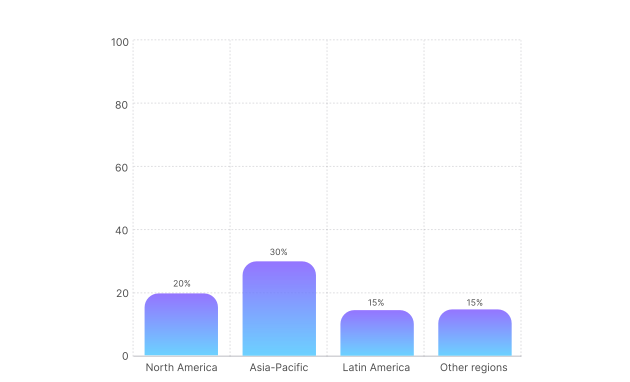
Why focus on ChatGPT Shopping Research optimization?
Optimizing your product data for ChatGPT helps you:
- Reach users with strong purchase intent
- Build trust by giving ChatGPT accurate data
- Reduce price or stock errors
- Control whether a product appears in search or checkout through simple feed flags
ChatGPT at a glance: Search overview
ChatGPT users turn to AI most often in categories that involve comparison, detailed specs, or higher-stakes decisions. These are the moments when a clear explanation matters, and where accurate product data helps the AI guide shoppers with confidence.
How do top product categories influence content strategy?
The more complex the purchase, the more important your product information becomes. High-intent shoppers rely on ChatGPT to sort through options, so products with complete, structured data are more likely to appear in these recommendation-driven searches.
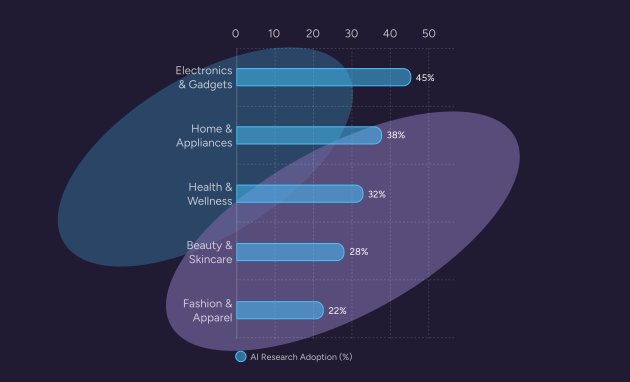
Pro tip:
Use this data to prioritize your optimization efforts. If you sell electronics or appliances, your technical specifications must be flawless because ChatGPT uses them to build comparison tables for users.
Best practices for ChatGPT product content
In AI search, your product page works as a set of data points. ChatGPT isn’t looking at marketing language; it looks for the core details that help it understand what the product is and who it’s for. A direct feed is the best way to control this information, since it provides a clean, consistent source that the AI can trust.
According to the OpenAI Product Feed Specification, the following fields are required for a valid integration:
Pro tip:
AI models use GTINs to understand that the “Sony WH-1000XM5” on your site is the same object as the one mentioned in a generic “best headphones” article. Without it, you lose the connection.
Optimize for discoverability
How can I make my products easy for AI to understand?
AI crawlers (like OAI-SearchBot) prioritize content that is machine-readable. Implementing Schema markup (JSON-LD) and submitting a direct feed are the best ways to speak the AI’s language.
Key steps
- Submit a direct feed: Apply for the OpenAI Merchant program and submit a standardized CSV or XML feed. This acts as the “source of truth” for the AI.
- Use control flags: Use the enable_search flag to explicitly tell ChatGPT which products should appear in search results.
- Implement Product Schema: On your site, wrap your product details in Product schema code. This reinforces the data provided in your feed.
- Use natural language in descriptions: Write descriptions that answer specific questions. Instead of “State-of-the-art suction,” use “Cleans hardwood floors and carpets effectively.”
- Fix crawl blocks: According to the Overview of OpenAI Crawlers, you must ensure your robots.txt file allows access to OAI-SearchBot so your site content can be verified against your feed.
Optimize for discoverability
How can I get cited as the “best” option?
AI models are trained to prioritize credibility. They look for consensus across the web. If expert blogs, user reviews, and your own site all agree your product is excellent, the AI will recommend it.
Core ranking factors:
- Hyper-freshness: According to Search Engine Land’s optimization guide, OpenAI’s feed specs support updates as frequently as every 15 minutes. Keeping price and availability accurate to the minute is a major reliability signal.
- Feed-to-site consistency: ChatGPT validates your feed data against your website. If your feed says $50 but your site says $60, trust is broken, and ranking drops.
- Brand authority: Being mentioned in reputable third-party articles and guides builds the “knowledge graph” connection that AI relies on.
- Review sentiment: AI analyzes the text of reviews, not just the star rating. Detailed, positive user feedback helps the AI understand why your product is good.
- Direct answers: Content that directly answers “People Also Ask” style questions (e.g., “Is this material waterproof?”) is more likely to be extracted for an answer.
Pro tip:
Add a short FAQ section to your product pages that answers clear, specific questions. Use simple, complete sentences. This gives the AI ready-made information it can use when generating answers.
Best practices for product imagery
ChatGPT uses images to verify product details and support what you provide in your feed. Clear, accurate visuals help the AI understand your product and recommend it in the right contexts.
What makes strong images for AI search?
AI models look at your photos to confirm attributes such as color, material, and style. Your main image should clearly show the product, while the rest of your gallery adds helpful context for size, features, and use cases.
How should I use imagery to support recognition?
Show key features clearly and make sure they match your written data. If you call out details like stitching, ports, or texture, include photos that make these elements easy to see. This helps the AI validate your product and surface it for relevant searches.
- Descriptive filenames: Save images as brand-model-color-feature.jpg, not IMG_592.jpg. This gives the AI a strong text cue.
- Rich alt text: Write alt text that describes the product visually and functionally (e.g., “Close up of waterproof zipper on black hiking backpack”).
- High resolution: Clear, sharp edges help computer vision models identify specific product features and logos.
- Contextual backgrounds: While white backgrounds are good for catalogs, lifestyle images with clear context (e.g., a tent in a forest) help the AI associate the product with a use case.Core Image Rules
Keep the best practices mentioned above when following ChatGPT’s technical requirements:
Using Plytix to autogenerate your ChatGPT Shopping Search feeds
How can Plytix simplify ChatGPT feed management?
Plytix PIM automatically fills your ChatGPT template with live product data, ensuring consistency and saving hours of manual work.
Let Plytix handle the heavy lifting. When your ChatGPT template lives in Plytix, you can map your attributes once, and let live product data fill the fields each time you export, without copy-pasting content.
Why it helps:
- Spot missing attributes and fill gaps in seconds.
- Keep your product data consistent across variants.
- Quickly generate optimized titles, bullets, and translations with AI.
- Export ready-to-upload templates straight to ChatGPT.
Learn more on how to set up your ChatGPT Shopping Search feed template in Plytix.
ChatGPT Shopping Search readiness checklist
Ready for the AI era? Before assuming your products are visible, make sure your site and data are easy for ChatGPT to access and understand.
Feed Management with Plytix
- Schema mapping: Internal attributes mapped to Schema.org standards.
- Feed health: OpenAI feed is validated against the developer specs.
- Attribute completeness: Missing specs identified and enriched in PIM.
Image optimization
- Filenames: All product images use descriptive, keyword-rich filenames.
- Alt text: Every image has unique, descriptive Alt Text implemented.
- Clarity: Main images are high-resolution and free of text overlays.
Core technical setup
- Merchant Account: Applied for access at the OpenAI Merchant portal.
- Crawl access: robots.txt is updated to allow OAI-SearchBot.
- Schema markup: Valid Product and Offer schema is live on all product pages.
- Mobile friendly: Site passes Google’s Mobile-Friendly test (AI indexes mobile versions).
Content and data quality
- Identifiers: Valid GTINs (UPC/EAN) are present in the feed and schema for all products.
- Feed Flags: enable_search is set to true for all public products.
- Structure: Product descriptions use H2/H3 headers and bullet points for easy parsing.
- Freshness: Prices and inventory status are updated in real-time via the feed.