
Amazon Seller Central Best Practices
Learn how to optimize your product listings for Amazon Seller Central using proven PIM and Amazon listing optimization best practices. This guide is updated twice a year to reflect Amazon’s latest requirements and marketplace changes.
Table of Contents
TL;DR: What This Guide Covers
- How to structure your Amazon Seller Central listings for discoverability and ranking
- Which product attributes matter most for search performance
- How to create compliant, high-impact images that convert
- How to automate your feed using Plytix PIM
- A launch checklist to confirm your listings are ready to publish
What is Amazon Seller Central?
Amazon Seller Central is the platform where third-party sellers list, price, and manage their products directly on Amazon. It differs from Vendor Central, which is used by manufacturers who sell to Amazon wholesale.
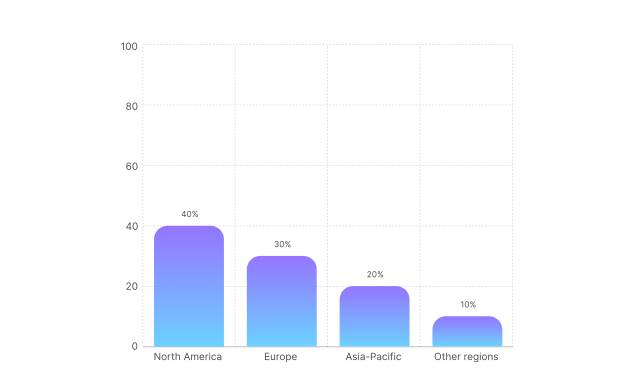
Amazon Marketplace is the largest ecommerce marketplace in North America and Europe, accounting for roughly 40% of all online retail transactions in those regions. Over 60% of U.S. consumers begin their product searches on Amazon, surpassing Google. So, it’s not just a place where products are sold, but also discovered.
For brands, this means exposure to millions of active buyers. This shift may change with the rise of AI-powered search, but having consistent, rich content on Amazon, will contribute to better agentic results and improved Amazon SEO performance.
The marketplace rewards well-structured, accurate data: products that are easy to find, compare, and trust.
Why focus on Amazon Seller Central Optimization?
Optimizing your Amazon Seller Central listings helps you:
- Rank higher in Amazon’s search results
- Increase conversions with structured, trustworthy data
- Avoid compliance issues that block or delay listings
- Prepare your catalog for visibility in AI-driven and Amazon SEO discovery tools
Amazon at a Glance: Marketplace Overview
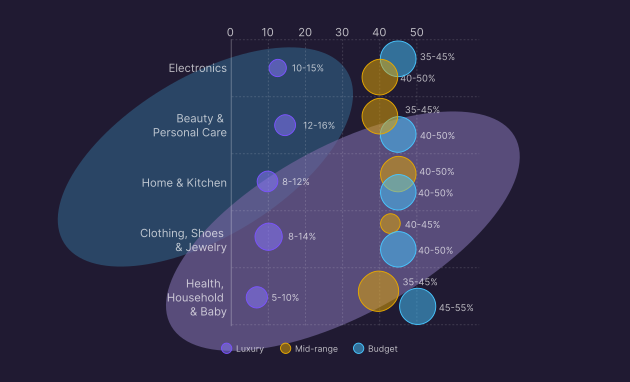
Amazon Marketplace is known for its breadth (you can buy almost anything), but some categories consistently outperform others. Understanding these trends helps sellers benchmark performance and align their content with category expectations.
How large is Amazon’s marketplace and which categories perform best?
Product categories like Electronics, Beauty, and Home & Kitchen consistently outperform others by volume across North America and Europe.
Pro tip:
Use this data to guide your listing strategy and level of detail. Competitive categories require higher-quality images, more attributes, and keyword-optimized content.
Best Practices for Amazon Content
Your listing is like a sales conversation. Shoppers scan, decide, and bounce in seconds, so your job is to remove friction. Put the most important information first, make it skimmable, and follow Amazon’s formats so the system can surface your product in the right searches.
Amazon’s categories vary, but the core is consistent. The following is the main information you always need to include in your feed:
Pro tip:
Categories often add a handful of “surprise mandatory” fields. Before you export, open the latest category flat file and scan for required attributes you might have missed, like material, voltage, or age range.
Optimize for discoverability
How can I make my listings easier to find in Amazon search?
Use natural, keyword-rich titles and descriptions, and make sure your product is placed in the right category, what Amazon calls a browse node. It’s essentially the path shoppers follow to find items (for example, Home & Kitchen → Cookware → Frying Pans). Choosing the right one helps Amazon show your product to the right audience.
Finally, ensure all required fields are complete and accurate, since Amazon’s search system favors listings that are well-structured and relevant to what shoppers are looking for.
Key steps
- Use key attributes naturally in Titles: Brand + Product type + Key attribute + Color + Size/pack count + Model number.
- Category: Map to the most accurate browse node for visibility and compliance.
- Keywords: Add relevant keywords naturally in titles, bullets, and descriptions without keyword stuffing.
- Bullets: Write concise, benefit-focused bullets (5–10 points) for easy skimming and quick decisions.
- Comparison blocks: Include a comparison block for multi-ASIN families highlighting differences clearly.
- Descriptions: Lead with benefits, include naturally flowing keywords.
- Compliance: Follow restricted category rules, labeling/documentation, and regional tax setup.
Optimize for Ranking
How can I help my listings appear higher in search results?
Amazon SEO prioritizes listings that shoppers engage with: those that get clicks, conversions, and positive reviews. Keeping your product data complete and accurate also helps Amazon trust and rank your listings higher.
Core ranking factors:
- Title length: Keep under 200 characters for algorithm-friendly formatting.
- Pricing: Test automated pricing for dynamic updates and monitor Buy Box eligibility.
- Content clarity: Remove friction by making listings skimmable. Put the most important info first.
- Completeness check: Ensure all required attributes are complete so the algorithm agrees with you.
Pro tip:
Write as if helping a friend pick the right product. Make sure a shopper can answer who it’s for, what it does, what’s in the box, and why yours is the safe choice in 10 seconds.
Best Practices for Amazon Images
On Amazon, images do the heavy lifting; they not only sell the click and reduce returns, but also play a crucial role in helping your product get discovered. Since around 60% of Amazon purchases happen on mobile devices, buyers often make split-second decisions based on what they see.
What makes a great product image on Amazon?
Clear, helpful images don’t just grab attention; they make your product easier to find on Amazon and more likely to get clicked.
Your main image should be clean and compliant with Amazon’s rules, while your gallery answers real questions: size, texture, included components, and how the product looks in everyday use.
How should I use images to highlight my product’s strengths?
Use your images to tell the story your title and bullets can’t. Each image should answer a real question a shopper might have – how it looks, feels, fits, or works. Aim for a mix of product, lifestyle, and detail shots that show the product in action and reduce hesitation.
- Highlight key features visually: If you sell headphones, include a closeup showing the foldable design or noise-canceling button.
- Reduce doubt with close-ups: Include detail shots that show textures, materials, or finishes so shoppers know exactly what they’re getting.
- Show benefits in context: For cookware, show a pan on the stove with food inside rather than just an isolated product shot.
- Demonstrate scale and fit: For furniture or décor, include a lifestyle photo that shows the piece in a real room to avoid size confusion.
- Show packaging and what’s included: If your product comes as a kit (like skincare sets or tool kits), include a “what’s in the box” image.
- Create a hero lifestyle image: Show the product being enjoyed by the target audience; someone using the coffee mug at a desk, a child playing with the toy, etc.
- Use clean infographics: Add size charts, care instructions, and key features in a list format as part of your media gallery. Skip watermarks, promo badges, and exaggerated claims.
Core Image Rules
Keep the best practices mentioned above when following Amazon’s technical requirements:
Using Plytix to autogenerate your Amazon feed template
How can Plytix simplify Amazon feed management?
Plytix PIM automatically fills your Amazon Seller Central template with live product data, ensuring consistency and saving hours of manual work.
Let Plytix handle the heavy lifting. When your Amazon template lives in Plytix, you can map your attributes once, and let live product data fill the fields each time you export, without copy-pasting content.
Why it helps:
- Spot missing attributes and fill gaps in seconds.
- Keep your product data consistent across variants.
- Quickly generate optimized titles, bullets, and translations with AI.
- Export ready-to-upload templates straight to Amazon Seller Central.
Learn more on how to set up your Amazon feed template in Plytix.
Amazon Product Launch Readiness Checklist
Ready to launch on Amazon? Before hitting “publish,” make sure your listing has everything it needs to succeed. This checklist helps you confirm that your product info is complete and optimized.
Feed Management with Plytix
- Missing attributes identified and enriched
- Attributes mapped once in Plytix
- Titles, bullets, and translations refined with AI
- Template exported and ready to upload to Amazon Seller Central
Optimization for Discoverability and Ranking
- Keywords in title, bullets, description (no stuffing)
- Comparison block added for multi-ASIN families (if applicable)
- Ensure all required attributes are complete (no missing fields)
- Listing is skimmable and friction-free
- Shoppers can answer: who it’s for, what it does, what’s included, and why it’s the safe choice
Core information
- Product identifiers: SKU, GTIN/UPC/EAN, brand, model number, manufacturer
- Title: Brand + Product Type + Key Attribute + Color + Size/ Pack + Model Number (≤200 characters)
- Bullet points (5–10, benefit-focused)
- Product description (lead with benefits, include keywords naturally)
- Category and browse node mapped correctly
- Variations (size, color) if applicable
- Price and currency set
- Packaging and shipping information defined
- Compliance certifications
- Tax setup for regionsFeed management with Plytix
Digital Media
- Main image: clean, white background, product fills ≥85% of frame
- Additional 5 images: Show size, use, and USPs