
eBay Best Practices Guide
Learn how to structure, optimize, and master your product data to achieve Top Rated status and maximum visibility on eBay’s global marketplace. This guide is updated twice a year to reflect eBay’s latest requirements and search algorithm changes.
Table of Contents
TL;DR: What This Guide Covers
- Mastering Item Specifics and structured data for eBay’s search algorithm.
- Strategies for achieving Top Rated Seller status and avoiding defects.
- Optimizing product titles and images for high search result visibility.
- Leveraging Plytix to manage complex, variant-heavy product catalogs.
- A quick readiness checklist for seamless listing and promotional launch.
What is eBay?
eBay is a global, consumer to consumer and business to consumer ecommerce platform known for its massive selection, auction formats, and focus on both new and pre-owned goods.
It operates uniquely by balancing traditional retail sales (Fixed Price) with consumer-driven categories like collectibles, used goods, and vehicle parts. The primary challenge is visibility. eBay’s proprietary search engine, Cassini, prioritizes listings that are complete, transparent, and backed by a flawless seller performance history. To win, your data must be structured perfectly using Item Specifics (structured data fields), which act as the filters buyers use to narrow their search from millions of items down to one.
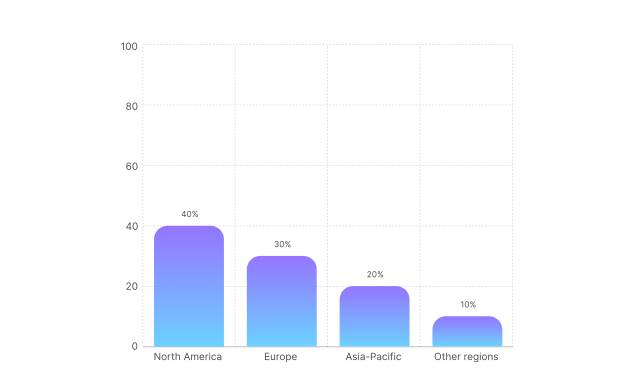
eBay’s revenue share by region
Why should brands focus on eBay listing optimization?
Optimizing your eBay listings helps you:
- Achieve higher ranking in Cassini (eBay’s proprietary search engine) search results by satisfying mandatory Item Specifics.
- Qualify for Top Rated Seller status, unlocking lower fees and enhanced visibility.
- Increase click-through rates and conversions by providing transparent, filterable data.
- Avoid penalties, such as lower visibility or account restrictions, due to poor seller metrics.
eBay at a glance: Marketplace overview
eBay’s diversity means a wide range of high-volume categories, from fast-moving consumer goods to high-value collectibles. Success often means mastering the unique demands of these segments.
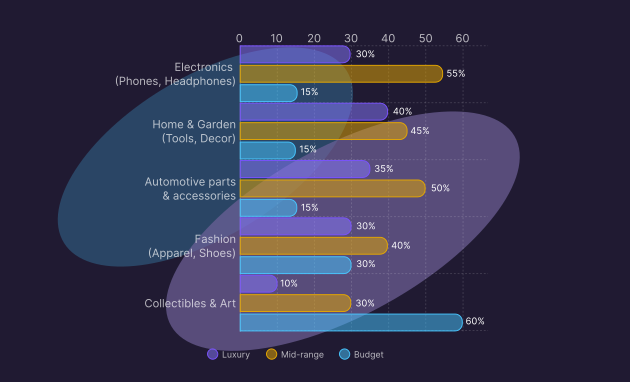
How do eBay’s top categories influence product data requirements?
Unlike structured retail platforms, eBay’s sales volume is split between new branded items (requiring UPCs) and secondary market goods (requiring condition details). This matrix reflects how sales volume typically falls across price and condition tiers.
Pro tip:
For Electronics and Automotive, listing without the UPC/EAN or MPN will significantly harm your visibility, as Cassini uses these identifiers to compare your listing against the official eBay Product Catalog.
Best practices for the product listing
On eBay, your listing is the ultimate source of truth. Every detail you provide, from the Item Specifics to the return policy, directly feeds the Cassini algorithm and impacts your ability to sell.
The following is the essential information you always need to include in your feed:
Pro tip:
eBay heavily favors listings that maximize Item Specifics, even the recommended ones. Treating relevant optional fields as mandatory data points is a simple way to increase your search visibility and reduce buyer questions, according to eBay’s Item Specifics Guide.
Mastering item specifics for discoverability
How do I structure my data to rank higher in Cassini search?
Cassini prioritizes structured data over keyword stuffing. The Item Specifics (the filter attributes like “Brand,” “Color,” “Style”) are the keys to the visibility kingdom. If you miss a required specific, your listing could be suppressed.
Key steps
- Maximize item specifics: Fill in every available Item Specific field (Required, Required Soon, and Recommended) for the item’s category. This allows buyers to find your item through granular filtering.
- Optimize the title: Use all 80 characters. Place keywords naturally, including Brand, MPN, Model, and Condition up front.
- Avoid conflicting data: Ensure your title, Item Specifics, and product description all match exactly. Inconsistent data will confuse Cassini and penalize your ranking.
- Use variations correctly: Group related items (like all sizes of a shoe) under a single listing using variations.
- Write concise descriptions: While less critical than Item Specifics, the description should be mobile-friendly, use bullet points, and not contain active content like JavaScript, as detailed in the Mastering eBay SEO Analysis.
Optimizing operations and reputation for ranking
How can I achieve Top Rated status and boost listing visibility?
eBay explicitly links your ranking to your operational performance metrics. Achieving Top Rated Seller status is the ultimate visibility booster, as these listings are favored in search results.
Core ranking factors:
- Transaction defect rate: Keep this below 2%. Unexpected seller cancellations (e.g., being out of stock) count as a defect, as outlined in the Seller Performance Policy.
- Late shipment rate: Must be kept below 3%. Prompt fulfillment is a critical ranking factor.
- Tracking upload validation: Provide valid tracking for nearly all orders to protect yourself and boost buyer confidence.
- Competitive pricing: Though not a direct defect, competitive pricing influences sales velocity, which is a major ranking signal.
- Promoted listings: Utilize Promoted Listings (Standard or Advanced) to pay for guaranteed visibility at critical moments, which complements your organic ranking. Review campaign options in the Promoted Listings Overview.
Pro tip:
To maintain a low defect rate, always keep your inventory synchronized. The quickest way to tank your Top Rated status is canceling an order because the item was out of stock.
Best practices for product imagery
Images are the first thing a buyer sees on eBay, and they are critical for building trust, especially in the used or collectible categories.
What are the main rules for product images on eBay?
eBay mandates clear, high-resolution photography and allows for a broader style than Google, but compliance is essential to avoid disapproval.How should I use images to highlight my product’s strengths?
How should I use imagery to maximize buyer confidence?
Use your twelve available images to provide maximum transparency and context. The imagery should eliminate any possible buyer doubt about the product’s condition, features, and scale.
- Use all 12 photos: Show the item from every angle, including close-ups of key features, labels, and packaging.
- Highlight condition: For used or collectible items, clearly photograph any flaws, wear, or damage. Honesty here reduces “Item not as described” returns.
- Maintain high resolution: Use images that are at least 500 pixels on the longest side, though 1,600 pixels is recommended for desktop zoom.
- No borders or text: Avoid adding decorative borders, watermarks, or promotional text that violates policy.
- Use secondary images wisely: Show accessories, scale (e.g., headphones on a mannequin head), or compatibility information.
Pro tip:
For high-value items or collectibles, use the video feature in your listing. Showing a 360-degree view of a vintage watch or running a new laptop through its paces builds immense confidence.
Core Image Rules
Keep the best practices mentioned above when following eBay’s technical requirements:
Using Plytix to autogenerate your eBay feed template
How can Plytix simplify eBay data management?
Plytix PIM automatically fills your eBay template with live product data, ensuring consistency and saving hours of manual work.
Let Plytix handle the heavy lifting. When your eBay template lives in Plytix, you can map your attributes once, and let live product data fill the fields each time you export, without copy-pasting content.
Why it helps:
- Spot missing attributes and fill gaps in seconds.
- Keep your product data consistent across variants.
- Quickly generate optimized titles, bullets, and translations with AI.
- Export ready-to-upload templates straight to eBay.
Learn more on how to set up your eBay feed template in Plytix.
eBay product launch readiness checklist
Ready to launch on the marketplace? Before hitting “list,” ensure your product content and operational readiness meet eBay’s standards. This checklist helps you confirm readiness for success.
Feed Management with Plytix
- Item specifics audit: Missing attributes identified and enriched in the PIM
- Attributes mapped: Once in Plytix for automated channel export
- Titles and descriptions: Optimized and ready for export
- Template: Exported and ready to upload to eBay Seller Hub
Optimization and seller health
- Promoted listings: Ad rate percentage set for Promoted Listings to ensure visibility
- Operational readiness: Shipping labels and tracking system confirmed
- Seller standards: Ready to maintain low defect and late shipment rates
Core feed and listing information
- Product identifiers: UPC/EAN, MPN, and Brand provided for all branded items
- Item specifics: All required and recommended fields for the category are completed
- Title and description: Optimized with keywords and matching Item Specifics
- Categorization: Item listed in the most granular and correct eBay category
- Variations: All sizes and colors grouped under one listing
- Shipping and returns: Handling time and a free 30-day return policy are set
- Inventory: Stock levels are accurate and synchronized with the PIMDigital Media
Imagery and media
- Main image: High resolution, no borders, no text overlays
- Image count: Maximum 12 photos uploaded, showing condition and detail
- Videos: Added for high-value or complex items