
Google Shopping Best Practices Guide
Learn how to structure, optimize, and master your product data to achieve top performance, faster fulfillment, and higher visibility on the Google Shopping platform. This guide is updated twice a year to reflect Google’s latest algorithm and Merchant Center requirements.
Table of Contents
- What is Google Shopping?
- Why should brands focus on Google Shopping optimization?
- Google Shopping at a glance: Platform overview
- Best practices for the product listing
- Best practices for product imagery
- Using Plytix to autogenerate your Google Shopping feed template
- Google Shopping product launch readiness checklist
TL;DR: What This Guide Covers
- Strategies for achieving a high Quality Score and low Cost Per Click.
- How to structure product titles and images for high click-through rates.
- Identifying and completing Google’s required and recommended product attributes.
- Leveraging Plytix to manage, optimize, and synchronize your product feed.
- A final checklist for launching Performance Max and Standard campaigns.
What is Google Shopping?
Google Shopping is not a marketplace; it is an intelligent, visual advertising platform that displays your products directly on Google Search, Images, and other properties. It operates through the Google Merchant Center (where you upload and validate your product data feed) and Google Ads (where you manage campaigns and bidding).
Unlike a traditional ecommerce marketplace, where you compete against other sellers on one site, Google Shopping surfaces your product listing ads (PLAs) against competitors across the open web. This visual approach, which includes an image, price, and merchant name, captures the customer’s attention when they have the highest commercial intent.
Why should brands focus on Google Shopping optimization?
Optimizing your Google Shopping feed helps you:
- Capture high-intent customers who are actively ready to purchase.
- Increase visibility in search results, often placing your product above traditional text ads.
- Achieve a higher Quality Score, which directly leads to lower cost per click and higher return on ad spend.
- Feed Google’s AI-driven search system with complete, accurate data, improving match relevance.
Google Shopping at a glance: Platform overview
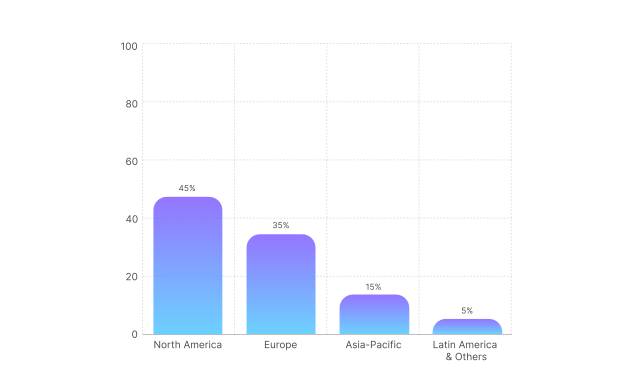
Google Shopping dominates retail ad spend because it reaches users at the decisive moment of purchase intent. Understanding where your competitors spend their money helps you prioritize optimization
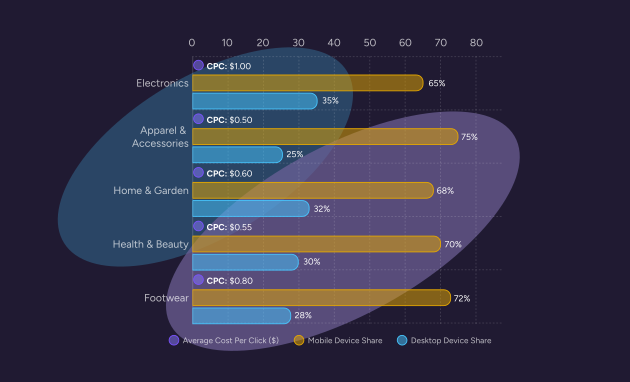
How do product categories and device usage affect campaign strategy?
Ad spend is naturally clustered in product categories with high average order value and strong visual appeal. Additionally, mobile devices generate the majority of clicks, making mobile-ready content critical.
Pro tip:
Use this data to guide your bidding strategy and mobile optimization. Products with high CPC (like Electronics) require a ruthlessly optimized feed to achieve a higher Quality Score and make your clicks cheaper than the competition.
Best practices for the product listing
The product feed is your campaign. Every attribute must be accurate, up to date, and formatted correctly for Google Merchant Center. Errors here lead to product disapprovals, wasted ad spend, and poor performance.
According to the Google Merchant Center Product Data Specification, the following table details the main information you always need to include in your feed:
Pro tip:
The Google Product Category (GPC) must use Google’s official taxonomy. Do not guess; categorize to the deepest level (e.g., Apparel & Accessories > Clothing > Outerwear > Coats). This is fundamental for ad relevance.
Mastering required attributes for visibility
How do I structure my product data to rank for key searches?
Google’s ad relevance is determined almost entirely by your product feed data. Getting your Title, GTINs, and Product Category right is the fastest way to improve your visibility for high-purchase-intent searches.
- Optimize the title: According to Google’s Title Optimization Tips, you should place the most relevant attributes first, as titles often truncate. Use a structure like: Brand + Product Type + Key Attribute (e.g., color/ size/material).
- Use unique identifiers: Include accurate GTINs (Global Trade Item Numbers) for branded products to increase trust and ad distribution.
- Refine the category: Use both the Google Product Category (GPC) (Google’s taxonomy) and your own Product Type (your internal hierarchy) to provide maximum context.
- Ensure landing page match: The price, availability, and product details in the ad must precisely match the landing page content to avoid disapprovals.
- Utilize custom labels: Group products by strategic criteria (e.g., margin, seasonal best sellers, shipping speed) using custom_label_0 through custom_label_04.
Optimizing performance for high return on ad spend
How can I lower my costs and improve my ad performance?
In Google Shopping, performance is driven by Quality Score, which is Google’s estimate of the quality and relevance of your ads and landing pages. A higher Quality Score means lower Cost Per Click (CPC) and better ad position.
Core ranking factors:
- Ad relevance: Your product title and image must match the search query and the landing page perfectly.
- Expected click-through rate (CTR): As explained in About Quality Score, high-quality images, competitive pricing, and strong titles boost your CTR, signaling relevance to Google.
- Landing page experience: The page must load fast, be mobile-friendly, and clearly feature the product and price advertised.
- Competitive pricing: Price is visually dominant in the ad; noncompetitive pricing leads to low CTR and poor Quality Score.
- Bidding strategy: Use automated strategies like Target ROAS (Return on Ad Spend) to let Google’s AI optimize bids for profit, rather than clicks
Pro tip:
When auditing your feed, check the Merchant Center’s Diagnostics page daily. Disapproved items severely hurt account reputation and visibility; fix them instantly, just like checking for broken furniture parts before they ship.
Best practices for product imagery
Images are the primary driver of clicks in Google Shopping. They need to be professional, compliant, and instantly communicate the product’s value.
What are the main rules for product images in Google Shopping?
Google has strict rules for the main image to ensure a clean, standardized comparison experience. Non-compliant images will get your products disapproved.
How should I use imagery to maximize click-through rate?
Use your images to maximize the visual impact in the ad carousel, but reserve lifestyle shots for your additional image attributes, adhering to Google’s policies.
- Main image compliance: Must have a pure white background and show the product clearly, filling 75% to 90% of the image frame.
- Avoid promotional text: Never include watermarks, brand names, logos, or text overlays (like “Free Shipping” or “Sale!”) on the main product image.
- Use secondary images wisely: Use the additional image_link fields to provide lifestyle shots, alternate views, and scale representations.
- Maintain high resolution: Use images that are at least 1,000 x 1,000 pixels to enable zoom functionality and improve visual quality.
- Match variants: If your feed specifies a blue product, the image for that variant must show the blue product, not a red one.
Core Image Rules
Keep the best practices mentioned above when following Google Shopping’s technical requirements:
Using Plytix to autogenerate your Google Shopping feed template
How can Plytix simplify Google Shopping data management?
Plytix PIM automatically fills your Google Shopping template with live product data, ensuring consistency and saving hours of manual work. Let Plytix handle the heavy lifting. When your Google Shopping template lives in Plytix, you can map your attributes once, and let live product data fill the fields each time you export, without copy-pasting content.
Why it helps:
- Spot missing attributes and fill gaps in seconds.
- Keep your product data consistent across variants.
- Quickly generate optimized titles, bullets, and translations with AI.
- Export ready-to-upload templates straight to Google Shopping.
Learn more on how to set up your Google Shopping feed template in Plytix
Google Shopping product launch readiness checklist
Ready to launch your ads? Before activating your campaigns, check that your feed and landing pages meet Google’s demanding standards. This checklist helps you confirm readiness for success.
Core feed and account information
- Account setup: Google Merchant Center and Google Ads accounts linked
- Feed submission: Primary feed uploaded and approved in Merchant Center
- Product identifiers: GTINs, MPNs, and unique IDs included for all relevant products
- Title and description: Optimized with keywords and matching landing page
- Categorization: Google Product Category (GPC) and Product Type mapped to the deepest level
- Pricing and availability: Price and stock status are accurate and updated via API or scheduled sync
Image and landing page compliance
- Main image: White background, no promotional text, high resolution
- Landing page: Loads quickly and is mobile-friendly
- Checkout: Secure, simple, and complies with Google’s policies (visible shipping and returns)
Campaign optimization
- Custom labels: Used to segment products by profitability, margin, or seasonality
- Negative keywords: A Comprehensive list added to campaigns to filter irrelevant traffic
- Bidding strategy: Automated bidding (Target ROAS) implemented after achieving sufficient conversion data
- Performance max: Campaigns are utilizing high-quality creative assets