
Meta Commerce Best Practices Guide
Learn how to optimize your product listings for Meta Commerce
using proven PIM and Meta Commerce listing optimization best
practices. This guide is updated twice a year to reflect Meta’s latest
requirements and marketplace changes.
Table of Contents
- What is Meta Commerce?
- Why should brands focus on Meta Commerce optimization?
- Meta Commerce at a glance: Marketplace overview
- Best practices for the product feed
- Best practices for product imagery
- Using Plytix to autogenerate your Meta Commerce feed template
- Meta Commerce product launch readiness checklist
TL;DR: What This Guide Covers
- How to structure your product feed for Meta’s Advantage+ automation.
- Essential attributes for targeting the right audience on Facebook and Instagram.
- Best practices for mobile-first, highengagement product imagery.
- Leveraging Plytix to centralize and automate your social commerce feed.
- A simple readiness checklist for launching a seamless shop.
What is Meta Commerce?
Meta Commerce encompasses Facebook Shops and Instagram Shopping, allowing businesses to create a single, unified digital storefront across both apps.
Unlike search-based platforms (like Google or Amazon) where users hunt for specific items, Meta is a discovery platform. Users find your products while browsing their feed, watching Reels, or viewing Stories. This means your product data doesn’t just need to be accurate; it needs to fuel Meta’s powerful machine learning (Advantage+) to show the right product to the right person at the exact moment they’re ready to buy.
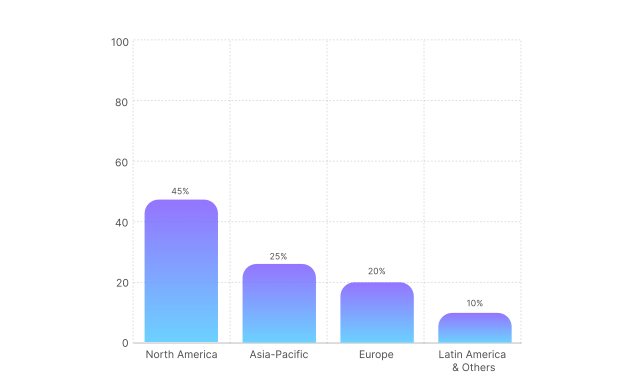
Why should brands focus on Meta Commerce optimization?
Optimizing your Meta Commerce catalog helps you:
- Unlock the power of Advantage+ catalog ads, which automatically personalize ad creative for each user.
- Reduce ad costs by improving relevance scores and match rates.
- Create a seamless, in-app shopping experience that reduces friction and boosts conversion.
- Retarget interested shoppers dynamically based on their browsing behavior.
Meta Commerce at a glance: Marketplace overview
Meta Commerce is defined by discovery and social connection, where inspiration often strikes before intent. Understanding these dynamics helps sellers tailor their visual strategies and leverage creator partnerships to meet consumer expectations.
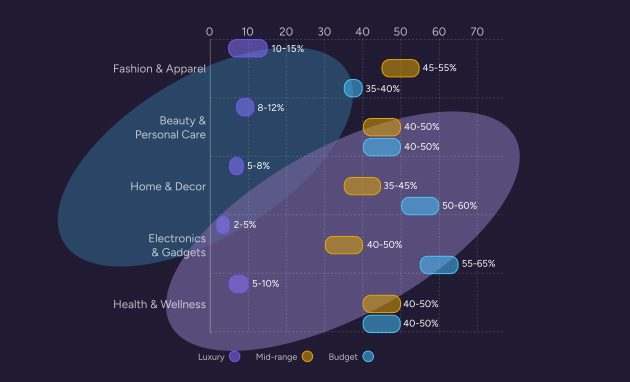
How do top product categories influence content strategy?
Product categories like Fashion & Apparel, Beauty, and Home & Decor consistently outperform others by volume, particularly across North America and the Asia-Pacific region
Pro tip:
Use this data to guide your creative strategy. If you’re in Fashion or Beauty, video (Reels) is non-negotiable. For Home & Decor, focus on Carousel ads that show how items fit into a lifestyle.
Best practices for the product feed
Your product feed is the engine that powers your entire Meta presence. If your data is messy, your ads will fail. Meta’s algorithm needs structured, granular data to match your products with the users most likely to buy them.
According to the Meta Business Help Center Data Feed Specifications, the following fields are essential for a healthy catalog:
Pro tip:
Don’t skip the Google Product Category (GPC). As highlighted in Meta’s Catalog Best Practices, Meta uses this taxonomy to understand what you are selling. Mapping this correctly is the single biggest “quick win” for ad relevance.
Mastering feed quality for Advantage+
How can I make my ads perform better automatically?
Meta’s Advantage+ tools use machine learning to find your customers. Your job is to give the AI the best possible data to work with.
- Standardize titles: Use a clear formula: Brand + Product Type + Key Feature + Color/Size. Keep important keywords in the first 30 characters.
- Use custom labels: Segment your products strategically (e.g., “Best Sellers,” “High Margin,” “Clearance”) using Custom Labels 0-4 to control bid strategies.
- Fix availability errors: Ensure your inventory sync is real-time. Advertising an out-of-stock item is the fastest way to burn budget and annoy customers.
- Enrich attributes: For apparel, filling in fields like gender, age_group, color, and size is mandatory for dynamic retargeting to work effectively.
- Verify pixel matching: Ensure the content_id in your feed matches the content_id fired by your Meta Pixel. If these don’t match, retargeting breaks.
Optimizing content for discovery
How can I stop the scroll?
On Meta, your product image is your headline. Users scroll fast, so your content needs to be visually arresting and instantly understandable.
Core ranking factors:
- Use lifestyle images: While white backgrounds are safe, lifestyle images often perform better for discovery. Show the product in use.
- Mobile-first formatting: Ensure titles and descriptions are concise. Most users are on mobile, where long text gets truncated.
- Leverage video: Upload product videos to your feed. Meta prioritizes video content in discovery algorithms like Reels.
- Highlight promotions: Use the sale_price and sale_price_effective_date fields to automatically trigger “Sale” badges on your ads.
Pro tip:
Meta automatically crops images for different placements. Always keep the product centered to ensure it looks great whether it’s in a square Feed post or a vertical Story ad.
Best practices for product imagery
Visuals are the currency of social media. Your catalog images need to be high-resolution and optimized for mobile screens.
What are the main rules for product images on Meta?
According to Meta’s Catalog Image Recommendations, Meta requires clean, high-quality images but offers more flexibility than Amazon regarding creativity.
How should I use imagery to maximize engagement?
Use your primary image to grab attention and secondary images to provide detail.
- Resolution matters: Use images that are at least 1,024 x 1,024 pixels. Square (1:1) is the standard format for carousel and collection ads.
- Avoid text overlays: Keep text off your main image. Text overlays can trigger low-quality flags or get cut off in different ad placements.
- Show the product clearly: The product should be the focal point. Avoid cluttered backgrounds that distract from the item.
- Consistency: Maintain a consistent visual style across your catalog so your dynamic carousel ads look cohesive.
Core Image Rules
Keep the best practices mentioned above when following Meta’s technical requirements:
Using Plytix to autogenerate your Meta Commerce feed template
How can Plytix simplify Meta Commerce feed management?
Plytix PIM automatically fills your Meta Commerce template with live product data, ensuring consistency and saving hours of manual work.
Let Plytix handle the heavy lifting. When your Meta Commerce template lives in Plytix, you can map your attributes once, and let live product data fill the fields each time you export, without copy-pasting content.
Why it helps:
- Spot missing attributes and fill gaps in seconds.
- Keep your product data consistent across variants.
- Quickly generate optimized titles, bullets, and translations with AI.
- Export ready-to-upload templates straight to Meta Commerce.
Learn more on how to set up your Meta Commerce feed template in Plytix.
Meta Commerce product launch readiness checklist
Ready to launch your shop or a new campaign? Before hitting “publish,” verify your catalog health and settings.
Feed management with Plytix
- Mapping audit: All required Meta fields are correctly mapped in Plytix.
- Schedule set: Feed update schedule aligns with inventory velocity.
- Error check: Feed processed with no critical errors in Commerce Manager.
Creative and media assets
- Main image: High-resolution (1080×1080), square, product-focused.
- Additional images: Lifestyle and detail shots included in additional_image_link.
- Video: Product videos mapped where available.
- Compliance: No text overlays or watermarks on catalog images.
Core feed and account information
- Business Manager: Account is verified and linked to your Page and Catalog.
- Pixel & CAPI: Meta Pixel and Conversions API are active and matching feed IDs.
- Product identifiers: GTIN/UPC and Brand are present for all items.
- Categorization: Google Product Category is mapped to the deepest relevant level.
- Inventory: Stock levels are accurate and syncing frequently (hourly/daily).
Optimization and strategy
- Custom labels: Products segmented by margin, seasonality, or best-seller status.
- Titles: Optimized for mobile (key details in first 30 chars).
- Demographics: Gender, age, and size attributes filled for fashion items.
- Pricing: Sale prices and effective dates populated for active promotions.