
Walmart Marketplace Best Practices Guide
Learn how to optimize your product listings for Walmart Marketplace using proven PIM and listing optimization best practices. This guide is updated twice a year to reflect Walmart’s latest algorithm updates and Listing Quality Score requirements.
Table of Contents
- What is Walmart Marketplace?
- Why should brands focus on Walmart listing optimization?
- Walmart at a glance: Marketplace overview
- Best practices for the product listing
- Best practices for product imagery
- Using Plytix to autogenerate your Walmart feed template
- Walmart product launch readiness checklist
TL;DR: What This Guide Covers
- Strategies for maximizing your Listing Quality Score (LQS).
- Essential attributes for Walmart’s strict categorization and filtering.
- Best practices for high-resolution, compliant product imagery.
- Leveraging Plytix to centralize and automate your Walmart feed.
- A simple readiness checklist for launching a seamless catalog.
What is Walmart Marketplace?
Walmart Marketplace is a curated community of professional sellers whose products appear alongside Walmart’s own inventory on Walmart.com. It operates as a closed platform, meaning sellers must apply and be approved based on their reputation, catalog quality, and operational ability.
Walmart functions as a hybrid retailer/ marketplace. Its search algorithm prioritizes Listing Quality Score, competitive pricing, and fast shipping (often via Walmart Fulfillment Services or WFS). According to Walmart’s Listing Quality Dashboard Guide, the platform uses a holistic approach to visibility, where content quality, offer competitiveness, and post-purchase performance all weigh into your ranking.
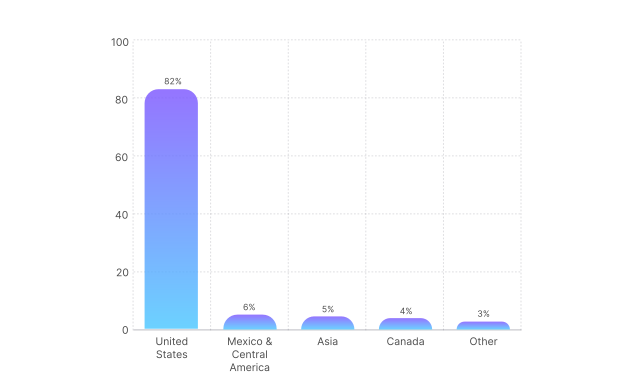
Walmart Marketplace Share by Region
Why should brands focus on Walmart listing optimization?
Optimizing your Walmart listings helps you:
- Win the Buy Box by maintaining a high Listing Quality Score and a competitive price.
- Increase visibility in a less crowded market, putting your products in front of millions of loyal customers.
- Avoid unpublishing risks caused by pricing errors or missing required attributes.
- Qualify for Pro Seller status, unlocking badges and rewards that boost conversion.
Walmart at a glance: Marketplace overview
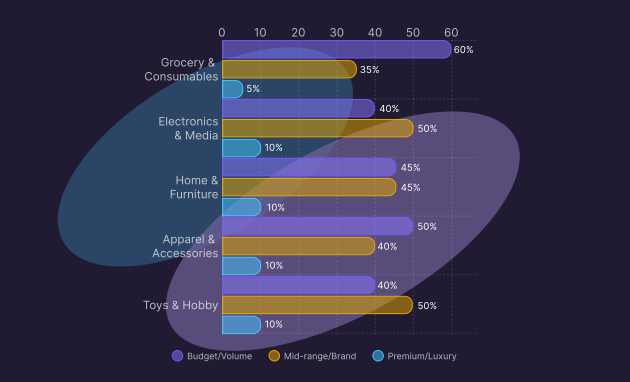
Walmart’s strength lies in its massive reach across essential categories. Understanding these volume drivers helps ecommerce managers align their content strategy with high-demand product groups.
How do top product categories influence content strategy?
Walmart shoppers value price and practicality. Success depends on clear value propositions in high-volume, everyday categories.
Pro tip:
Use this data to guide your pricing strategy. Walmart’s core customer is price-sensitive but brand-loyal. Ensuring your pricing is competitive against other major marketplaces is critical for winning the Buy Box.
Best practices for the product listing
Your Walmart listing is constantly graded. The Listing Quality Score (0-99) is a visible metric that tells you exactly how well your content, offer, and performance measure up. A low score means low visibility.
According to SEO Best Practices for Item Setup, the following information is essential for your feed:
Pro tip:
Do not skip the Key Features section. Walmart indexes these bullet points heavily for search. Use them to highlight the top 3-5 benefits of your product clearly and concisely
Mastering content for discoverability
How can I make my listings easy to find using Walmart’s search?
Walmart’s search engine rewards specificity. Listings that are correctly categorized and attribute-rich are surfaced more often in filtered searches, which is how most customers shop.
Key steps
- Use the title formula: Follow the standard outlined in Walmart’s SEO Best Practices: Brand + Product Name + Style/Model + Key Attribute + Pack Count. Keep it between 50-75 characters for optimal impact.
- Categorize correctly: Map your items to the deepest possible subcategory. Mis-categorization is the leading cause of low visibility.
- Fill recommended attributes: Don’t stop at “Required.” Filling in “Recommended” attributes directly boosts your Listing Quality Score.
- Write rich descriptions: Use the “Shelf Description” for a quick summary and the “Short Description” for detailed SEO-rich text (min 150 words).
- Avoid prohibited terms: Steer clear of marketing fluff like “Best Seller” or “Number 1,” which can get your listing flagged.
Optimizing operations and offering for ranking
How can I boost my Listing Quality Score?
Your Listing Quality Score isn’t just about text; it’s about the entire offer. Competitive pricing and reliable shipping are massive components of your ranking.
Core ranking factors:
- Price competitiveness: Your price must be equal to or lower than your offer on other marketplaces. As noted in the Walmart Buy Box Guide, Walmart monitors this aggressively.
- Shipping speed: Items with 2-Day or 3-Day delivery badges get a massive ranking boost. WFS is the easiest way to achieve this.
- In-stock rate: Frequent stockouts hurt your score long-term. Maintain deep inventory for top sellers.
- Review count: Actively managing and generating authentic reviews is essential for trust and ranking.
Pro tip:
Check your Listing Quality Dashboard weekly. It gives you specific, actionable advice (e.g., “Add ‘Material’ attribute to improve score by 5 points”). Follow these prompts like a treasure map.
Best practices for product imagery
On Walmart, images need to be clean, professional, and zoomable. The goal is to replicate the in-store experience of picking up a product and examining it.
What are the main rules for product images on eBay?
Walmart requires a pure white background for the main image to maintain a uniform, trustworthy catalog.
How should I use imagery to maximize conversion?
Use your image gallery to answer questions before they are asked. Show the product in use, show the scale, and show the details.
- Main image compliance: Must be on a seamless white background (RGB 255,255,255). No props, borders, or text.
- Enable zoom: Upload images that are at least 2,000 x 2,000 pixels to activate the zoom feature, allowing customers to inspect quality.
- Show variety: Include at least 4 images: front, back, side/detail, and a lifestyle/context shot.
- Rich media: Utilize “Rich Media” (videos, 360 views) if available for your category to significantly boost engagement.
Core Image Rules
Keep the best practices mentioned above when following Walmart’s technical requirements:
Using Plytix to autogenerate your Walmart feed template
How can Plytix simplify Walmart feed management?
Plytix PIM automatically fills your Walmart Marketplace template with live product data, ensuring consistency and saving hours of manual work.
Let Plytix handle the heavy lifting. When your Walmart template lives in Plytix, you can map your attributes once, and let live product data fill the fields each time you export, without copy-pasting content.
Why it helps:
- Spot missing attributes and fill gaps in seconds.
- Keep your product data consistent across variants.
- Quickly generate optimized titles, bullets, and translations with AI.
- Export ready-to-upload templates straight to Walmart Seller Center.
Learn more on how to set up your Walmart feed template in Plytix.
Walmart product launch readiness checklist
Ready to launch on Walmart? Before you upload, verify your catalog health and settings to ensure a high Listing Quality Score from day one.
Feed management with Plytix
- Validation: Feed validated in Plytix for missing mandatory fields.
- Mapping: All custom attributes mapped to Walmart’s spec.
- Sync: Inventory and price sync scheduled for frequent updates.
- Export: Final feed exported and ready for Seller Center upload.
Digital media
- Validation: Feed validated in Plytix for missing mandatory fields.
- Mapping: All custom attributes mapped to Walmart’s spec.
- Sync: Inventory and price sync scheduled for frequent updates.
- Export: Final feed exported and ready for Seller Center upload.
Core feed and listing information
- Product Identifiers: Valid GTIN/UPC provided for every item (no exemptions for most categories).
- Title: Optimized to 50-75 characters, following the naming convention.
- Key Features: 3-5 concise bullet points highlighting benefits.
- Description: At least 150 words of unique, keyword-rich content.
- Attributes: All required and recommended attributes are filled.
Optimization and compliance
- Pricing: Price is competitive with other marketplaces (Amazon/eBay).
- Shipping: Free 2-day or 3-day shipping enabled where possible.
- Category: Product mapped to the most granular sub-category available.
- Taxonomy: Correct Tax Codes assigned to every SKU.