
Wayfair Best Practices guide
A complete guide to optimizing product listings, improving conversion rates, and mastering content requirements for Wayfair’s home goods marketplace. Focuses on data structure, imagery, and operational excellence for high volume sales.
Table of Contents
TL;DR: What This Guide Covers
- Key strategies for boosting Wayfair search ranking and visibility.
- Identifying essential product data for Wayfair’s filter-based search.
- Best practices for high-converting, compliant product imagery.
- Leveraging Plytix PIM for automated feed creation and export.
- A simple readiness checklist for a successful product launch.
What is Wayfair?
Wayfair is a specialist ecommerce platform dedicated entirely to the home goods sector, acting as a direct-to-consumer marketplace.
Wayfair functions primarily as a curator, relying on suppliers to list and manage their products while handling the front-end customer experience. This is where the magic (and the pressure) happens: Wayfair demands highly structured specifications (like detailed dimensions, materials, and assembly info) for every product. They operate on a consignment model, meaning suppliers maintain inventory control while Wayfair manages the customer interface and marketing, reinforcing the necessity of perfect data synchronization. This focus on rich, accurate data allows their customers to filter millions of home products easily.
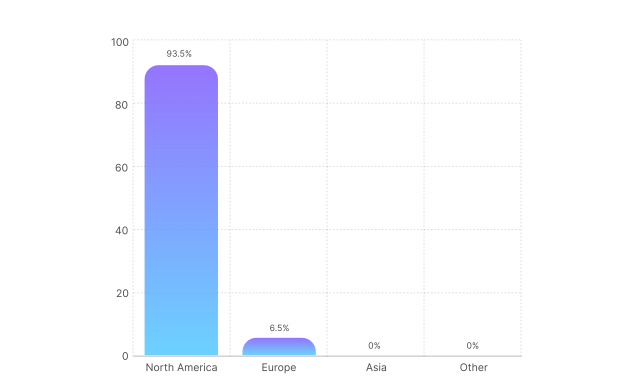
Wayfair Global Revenue Share
Why focus on Wayfair listing optimization?
Optimizing your Wayfair listings helps you:
- Rank higher in Wayfair’s search and filtering results.
- Increase conversions by providing the structured, rich data home shoppers require.
- Avoid costly compliance issues and listing suppression.
- Prepare your catalog for visibility in AI-driven discovery tools and virtual room planning
Wayfair at a Glance: Marketplace Overview
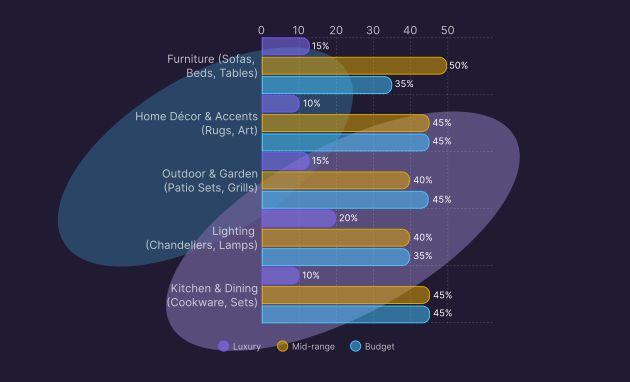
Wayfair is known for its incredible product depth across the home sector, but some categories consistently drive higher sales. Understanding these trends helps ecommerce managers benchmark performance and align their content strategy with high-demand product groups.
How does Wayfair’s product mix and category focus influence content strategy?
Wayfair’s strength lies in offering a wide range of styles and price points under their various banner brands (like AllModern, Birch Lane, and Perigold). This matrix shows the general focus across key product groups.
Pro tip:
Use this data to guide your listing strategy and level of detail. Competitive categories require higher qualit
Best practices for Wayfair content
Your Wayfair listing is a contract between you and the customer. Since they can’t actually touch a sofa or feel a throw blanket through the screen, your data must be perfect. Think of us as your digital co-pilot. Put the most critical information first, make it skimmable, and ensure Wayfair’s system can correctly categorize your product.
Wayfair’s categories require granular detail, but the following is the main information you always need to include in your feed:
Pro tip:
Categories often add a handful of “surprise mandatory” fields. Before you export, open the latest category template and scan for required attributes you might have missed, like weight capacity, voltage, or age range.
Mastering data and taxonomy for discoverability
How can I make my listings easy to find using Wayfair’s filters?
Wayfair’s search is heavily filter-based. Customers search for an item and then refine results by attributes like “color,” “material,” “assembly required,” or “sofa length.” Your listing will not appear if you miss the specific attribute a customer uses to filter.
Key steps
- Standardize data values: Match the values you provide for specific attributes (like “Color Family”) to the accepted template standards.
- Map the item class: Ensure your product is mapped to the most accurate Wayfair category and class for visibility.
- Use descriptive titles: Incorporate essential attributes naturally: Brand + Style + Material + Product Type.
- Optimize the data grid: Listings with complete attribute data appear more reliably in filtered searches, according to official Wayfair content standards.
- Write concise bullet points: Use the listing’s bullet points to highlight key features and benefits for quick skimming.
- Check compliance data: Ensure all mandatory compliance data, warnings, and certifications are provided.
- Include rich descriptions: Lead the product description with benefits and naturally flowing keywords.
Optimizing operations and fulfillment for ranking
How can I help my listings appear higher in search results?
Wayfair’s system prioritizes listings that guarantee a smooth customer experience. When the algorithm weighs ranking factors, high supplier scores for speed and reliability often trump minor content variations.
Core ranking factors:
- Content completeness: Listings with all required attributes filled out are favored for trust and visibility, according to Wayfair’s internal content standards.
- Pricing strategy: Ensure your wholesale cost is competitive, allowing Wayfair to offer a sharp retail price.
- Fulfillment speed: Fast and reliable shipping (meeting Service Level Agreements) is a critical ranking signal, directly impacting your “Perfect Order” rate, as detailed in Wayfair’s official order management guide.
- Customer experience metrics: Low return rates and positive reviews signal product accuracy, boosting ranking.
Pro tip:
Categories often add a handful of “surprise mandatory” fields. Before you export, open the latest category template and scan for required attributes you might have missed, like weight capacity, voltage, or age range.
Best Practices for Wayfair Images
On Wayfair, images don’t just sell the click; they are a critical piece of product data, helping customers confirm size, texture, and fit, which directly reduces costly returns.
What makes a great product image on Wayfair?
Clear, helpful images that follow Wayfair’s Partner Home requirements are absolutely essential. Your main image must be compliant, but your gallery needs to answer every question a shopper might have.
How should I use imagery to highlight my product’s strengths?
Use your images to tell the story your title and bullets can’t. Each image should answer a real question a shopper might have: how it looks, feels, fits, or works.
- Create a hero image: The main image should be a clean “silo shot” on a white background, but the rest of your gallery must include compelling lifestyle photography.
- Highlight key features visually: If your product has a special function (like a reclining sofa or folding table), include a close-up that demonstrates it.
- Show benefits in context: For cookware, show a pan on the stove with food inside, or for décor, show it placed in a styled room.
- Demonstrate scale and fit: For furniture or décor, include a lifestyle photo that shows the piece in a real room to avoid size confusion.
- Reduce doubt with close-ups: Include detail shots that show textures, materials, or finishes so shoppers know exactly what they’re getting.
- Show packaging and what’s included: If your product comes as a kit, include a “what’s in the box” image.
- Use rich media: If your product is complex (like a smart piece of furniture), use videos or assembly guides (see the Wayfair Partner Home Guide for details).
- Use clean infographics: Add size charts and key features in a list format as part of your media gallery. Skip watermarks and promo badges.
Pro tip:
Write as if helping a friend pick the right product. Make sure a shopper can answer who it’s for, what it does, what’s in the box, and why yours is the safe choice in 10 seconds.
Core Image Rules
Keep the best practices mentioned above when following Wayfair’s technical requirements:
Using Plytix to autogenerate your Wayfair feed template
How can Plytix simplify Wayfair data management?
Plytix PIM automatically fills your Wayfair feed template with live product data, ensuring consistency and saving hours of manual work.
Let Plytix handle the heavy lifting. When your Wayfair template lives in Plytix, you can map your attributes once, and let live product data fill the fields each time you export, without copy-pasting content.
Why it helps:
- Spot missing attributes and fill gaps in seconds.
- Keep your product data consistent across variants.
- Quickly generate optimized titles, bullets, and translations with AI.
- Export ready-to-upload templates straight to Wayfair Partner Home.
Learn more on how to set up your Wayfair feed template in Plytix.
Wayfair Product Launch Readiness Checklist
Ready to launch on Wayfair? Before hitting “publish,” make sure your listing has everything it needs to succeed. This checklist helps you confirm that your product info is complete and optimized.
Feed Management with Plytix
- Missing attributes: Identified and enriched within the PIM
- Attributes mapped: Once in Plytix for automated channel export
- Titles and descriptions: Optimized and ready for export
- Template: Exported and ready to upload to Wayfair Partner Home
Optimization for Discoverability and Ranking
- Keywords: Incorporated naturally in titles and bullets
- Completeness check: All required Wayfair attributes filled (no missing fields)
- Listing quality: Skimmable and friction-free
- Shopper confidence: Answers the “who, what, and why” questions
Core information
- Product identifiers: SKU, Wayfair ID, UPC/GTIN/EAN, Brand, manufacturer part number
- Title: Brand + Style + Material + Product Type Bullet points: (5-10, benefit-focused, concise)
- Product description: Lead with benefits, include natural keywords
- Category and class: Mapped correctly for filtering
- Variations: All sizes, colors, and textures included
- Price and currency: Wholesale cost set
- Compliance: Warnings, certifications, and tax setup complete
Digital media
- Main image: clean, white background, product fills ≥85% of frame
- Additional images: 5+ lifestyle and close-up shots
- Videos and guides: Included for complex items