The Hidden cost of product data coordination
Product teams don't live in one tool. Product data lives in your ERP, tasks live in Asana, conversations happen in Slack, and half of what needs to happen next is still stuck in someone's head. This coordination tax is real; according to Asana's 2023 Anatomy of Work Global Index, knowledge workers spend 58% of their day on coordination tasks like chasing updates and switching between tools.
If you're an ecommerce or marketing manager running operations without a dedicated IT department or dev team, this coordination tax hits twice as hard. You have highly specific, intricate team workflows, but you're often left choosing between rigid software that forces you to change how you work, or custom development you don't have the technical resources to build.
PIM automation made simple: Plytix meets Make.com
To connect your product catalog with the rest of your tech stack, Plytix offers a full spectrum of integration options. These range from native channels and pre-built connectors to a direct API for custom developer builds.
For custom PIM automation and tailored team workflows without touching code, Plytix connects seamlessly with Make.com integrations. While you can always rely on Plytix’s native features or direct API, pairing Plytix with Make gives non-technical managers the ultimate workbench to build, adapt, and scale custom workflows on their own terms.
Top product data use cases at a glance
Here is a preview of the five automation workflows covered in this guide:
- Instant Error Alerts: Send Slack or email notifications the second critical fields need attention in Plytix.
- Launch Handoffs: Auto-create Asana tasks with rich product details the moment a SKU reaches a new content stage.
- Weekly Data Health Reports: Schedule automated catalog audits that drop clean reports straight into Google Sheets.
- Asset Intake: Automatically pull reshot supplier visuals directly into your Plytix DAM from Google Drive or Dropbox.
- New SKU to Launch-Ready: Combine supplier spec sheets, AI description generation, and manager review tasks to take SKUs live in record time.
“We know the real value of PIM is fully realized when all your tools are connected. Now Plytix users have an easy, no-code way to sync all their product content in Plytix with thousands of solutions through Make.” – Trever Chidester, Director of Partnerships at Plytix
New to Plytix? See it in action.
Find out how Plytix can simplify the way you manage product data.
What can you actually do with the Plytix Make integration?
In plain terms, the integration gives you a visual workbench to move product data in and out of Plytix automatically. You drag and drop visual blocks inside Make to build your workflow.
Before diving into specific workflows, here are three basic terms Make uses to build automations:
- Scenario: The complete automated flowchart connecting your apps together.
- Module: An individual visual block inside a scenario (like Watch Products in Plytix or Create a Task in Asana).
- Filters & Routers: Visual rules that act as traffic lights to dictate when actions run or split paths based on custom conditions.
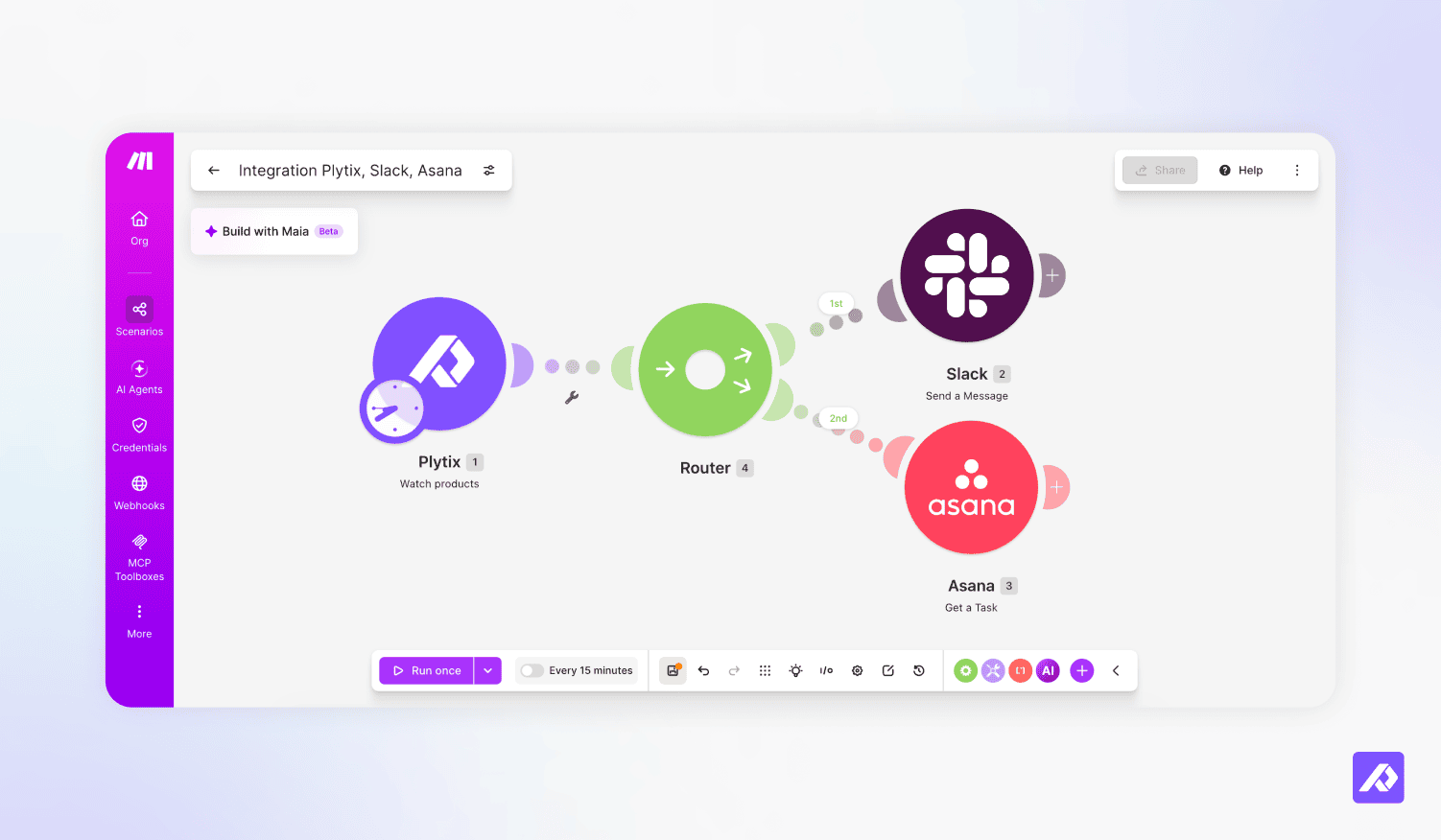
What you can automate out of the box
Here is a quick breakdown of how Make interacts with your Plytix catalog:
| What you want to do | How Make handles it in Plytix | Everyday Manager Example |
|---|---|---|
| Watch for catalog updates | Automatically detects when any product is created or updated in Plytix. | The moment a product status flips to "Ready," Make knows instantly without you checking Plytix manually. |
| Read and update product data | Reads existing details or writes new information back into Plytix fields. | Pulls product titles into Asana, or writes AI-generated descriptions directly back into Plytix. |
| Manage images and files | Uploads, searches, or replaces media in your Plytix DAM. | Automatically attaches reshot supplier photos from Google Drive directly to the right SKU. |
| Control rules without code | Places a visual Filter or Router after the Plytix step as a smart guardrail for your PIM integration. | Only alerts Slack if a price is empty, or only creates Asana tasks when a status hits "Launch-Ready". |
Pro Tip: Build scenarios instantly with AI prompts.
You don’t have to build these scenarios by hand or rely on rigid templates tied to specific tools (like being forced to use Salesforce when your team uses HubSpot).
Make features Maia (its built-in AI assistant), as well as official integrations for ChatGPT and Claude. In each use case below, we’ve included a Ready-to-Use AI Prompt. Simply copy and paste the prompt into Make’s AI builder or ChatGPT, and it will generate a tailored scenario mapped to your exact tech stack.
Step-by-step PIM automation blueprints
To help you implement each scenario across your tech stack, here is a detailed breakdown of the logic, filters, and AI prompts needed to get them running.
Use case #1: Instant catalog alerts
How do you get instant error and data alerts when Plytix product data changes or goes missing?
When critical product data goes missing or gets edited incorrectly in Plytix, you can send instant alerts directly to Slack, Teams, or email by creating a simple Make scenario that monitors your catalog for missing attributes.
There is nothing worse than discovering a live storefront listing with a missing hero image, a broken price, or a glaring typo after an angry customer emails support or a sales channel feed fails. Without automated alerts, product managers spend hours doing manual spot checks and pinging teammates just to verify if SKUs are ready for launch.
By connecting Plytix to Make, you never deal with manual catalog audits again. The moment an essential field goes missing or a product is altered, the right team member gets notified immediately with a direct link to fix the SKU inside Plytix.
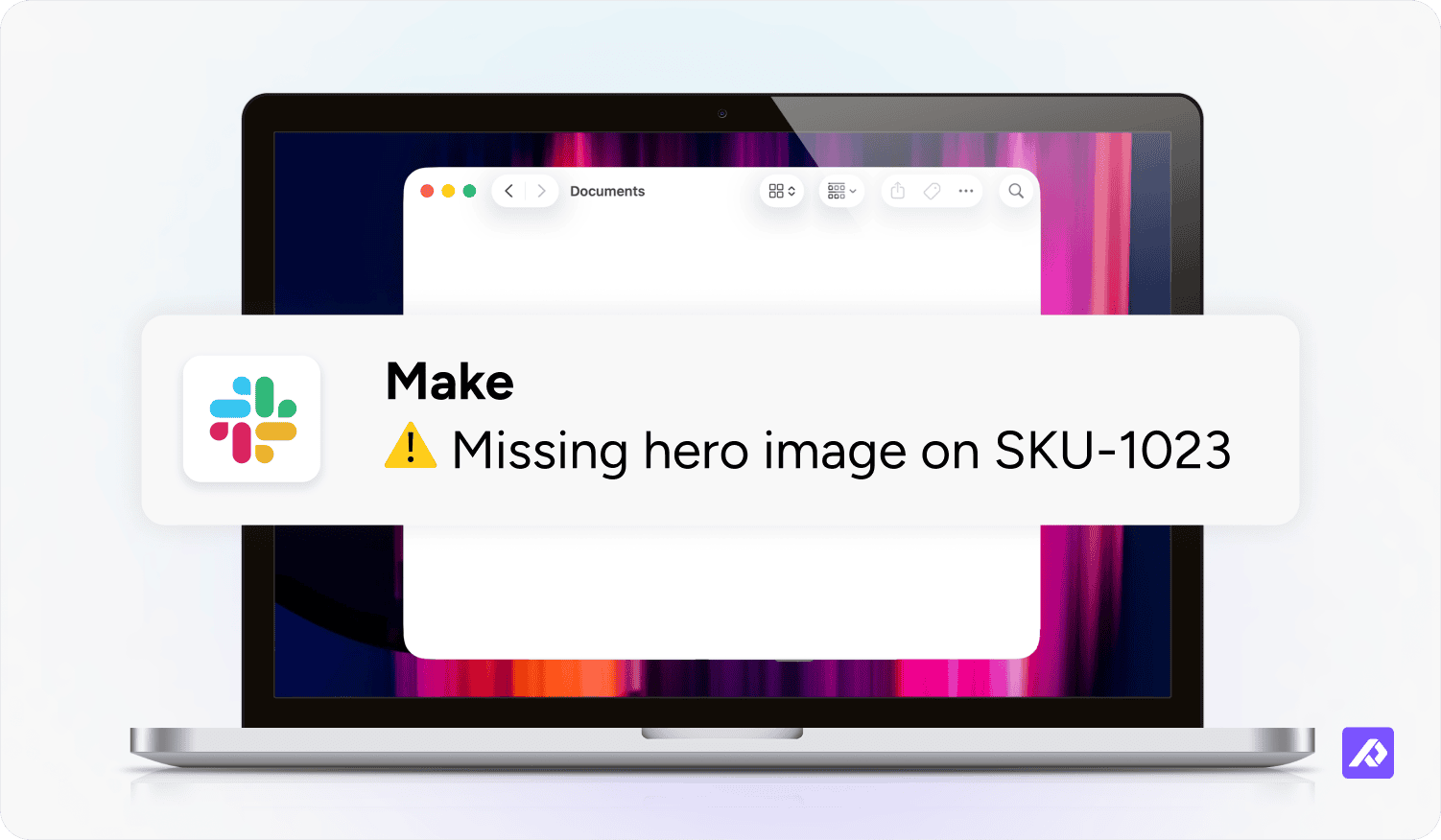
Scenario Logic:
- Trigger: Plytix Watch Products (detects catalog changes)
- Filter: Evaluates missing or broken fields (e.g., Price is empty OR Hero Image is missing)
- Action: Sends an alert to your messaging app with a direct link to fix the SKU inside Plytix
Ready-to-Use AI Prompt:
“Build a Make scenario using the Plytix integration. When a product is updated in Plytix, filter for cases where the price is empty or hero image is missing, and send an alert to my team’s instant messaging channel with the product name and direct Plytix URL.”
Use case #2: Cross-team launch handoffs
How do you automate cross-team launch handoffs in Plytix for Marketing, Design, Sales, and Support?
You can automate cross-team launch handoffs in Plytix by setting up a Make scenario that tracks status changes and automatically creates tasks for Marketing, Web Design, Sales, and Support the moment a product hits a new content milestone.
Launch bottlenecks usually happen because teams are kept in the dark. A product might reach a finished stage in Plytix, but your Marketing Manager cannot build email campaigns or social posts because nobody sent them the finalized title and pricing. Meanwhile, Web Design does not know the SKU is ready for page layout work. Days slip by simply because handoffs depend on someone remembering to send a manual update.
Instead of playing air-traffic controller, this workflow turns Plytix into an active launch trigger. As soon as a product's content stage updates in Plytix, Make creates actionable tasks in Asana, ClickUp, or Monday filled with exact product details so everyone moves in sync.
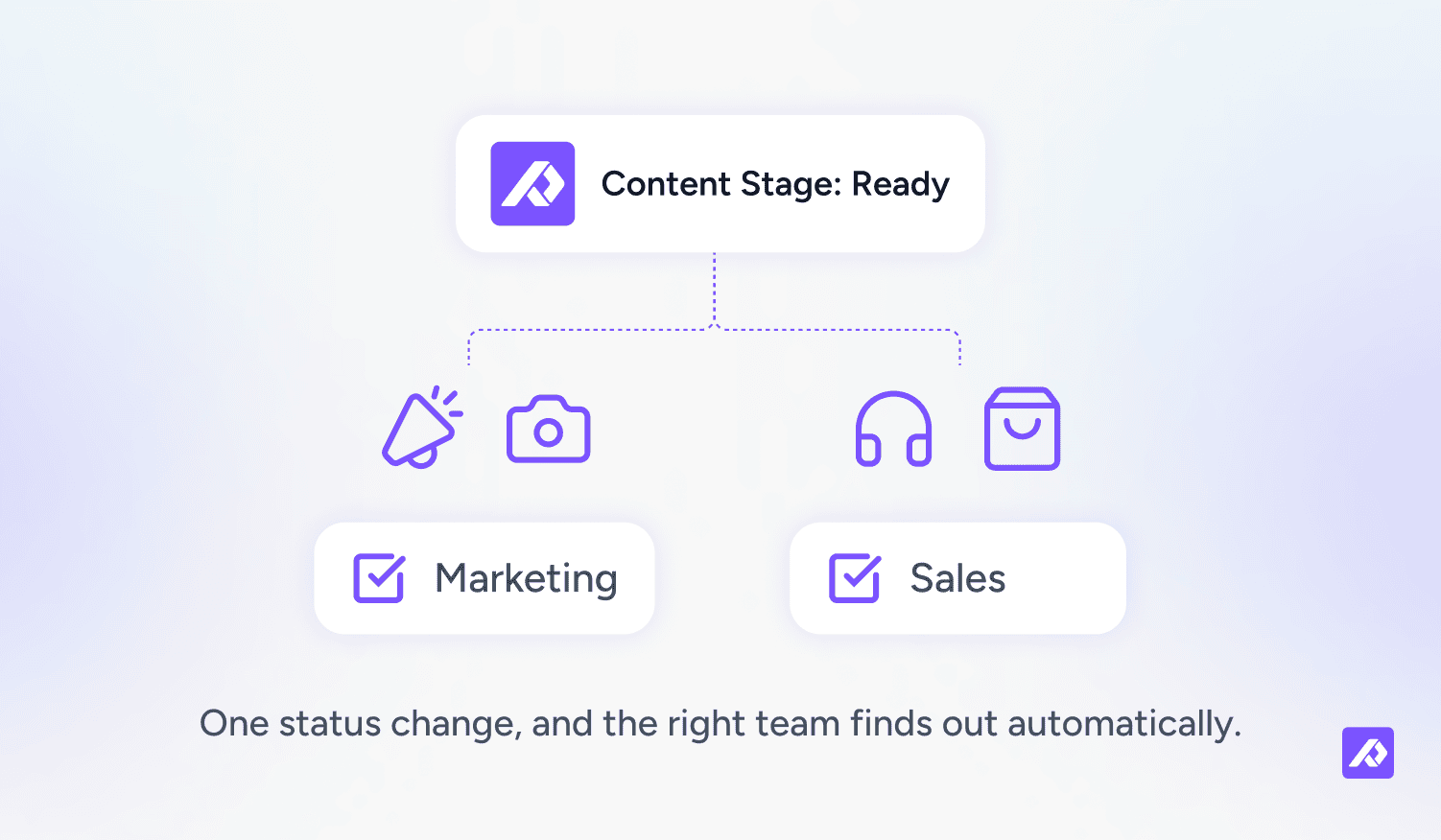
Scenario Logic:
- Trigger: Plytix Watch Products
- Router: Evaluates the product's Content Stage or Status attribute in Plytix
- Branch A (Marketing & Design): When status is "Ready for Content," creates tasks in your project management app populated with the product's official title, name, and pricing
- Branch B (Sales & Support): When status is "Launch Ready," broadcasts an update to Sales and Support
Ready-to-Use AI Prompt:
“Create a Make scenario with Plytix. When a product status changes in Plytix, use a router: if status is ‘Ready for Content’, create task items in my team’s project management tool containing the product title, name, and price. If status is ‘Launch Ready’, send a launch broadcast message to Sales.”
Use case #3: Scheduled catalog audits
How do you generate a weekly product data health report from Plytix?
To generate a weekly product data health report from Plytix, configure a scheduled Make scenario that automatically sweeps your catalog every week, gathers SKUs with missing details, and compiles them into a clean Google Sheets dashboard for your team.
Not every data issue happens during an active edit. SKUs often sit in a catalog for months missing dimensions, care instructions, or SEO tags simply because nobody ever went back to finish them. These silent gaps lie hidden until a marketplace integration rejects your feed or conversion rates drop on your store.
Unlike event-driven alerts that react to a quick change, this scheduled workflow acts as a recurring safety net. It proactively scans your entire catalog every Monday morning, giving your product operations lead a clean audit spreadsheet before incomplete data can impact your sales channels.
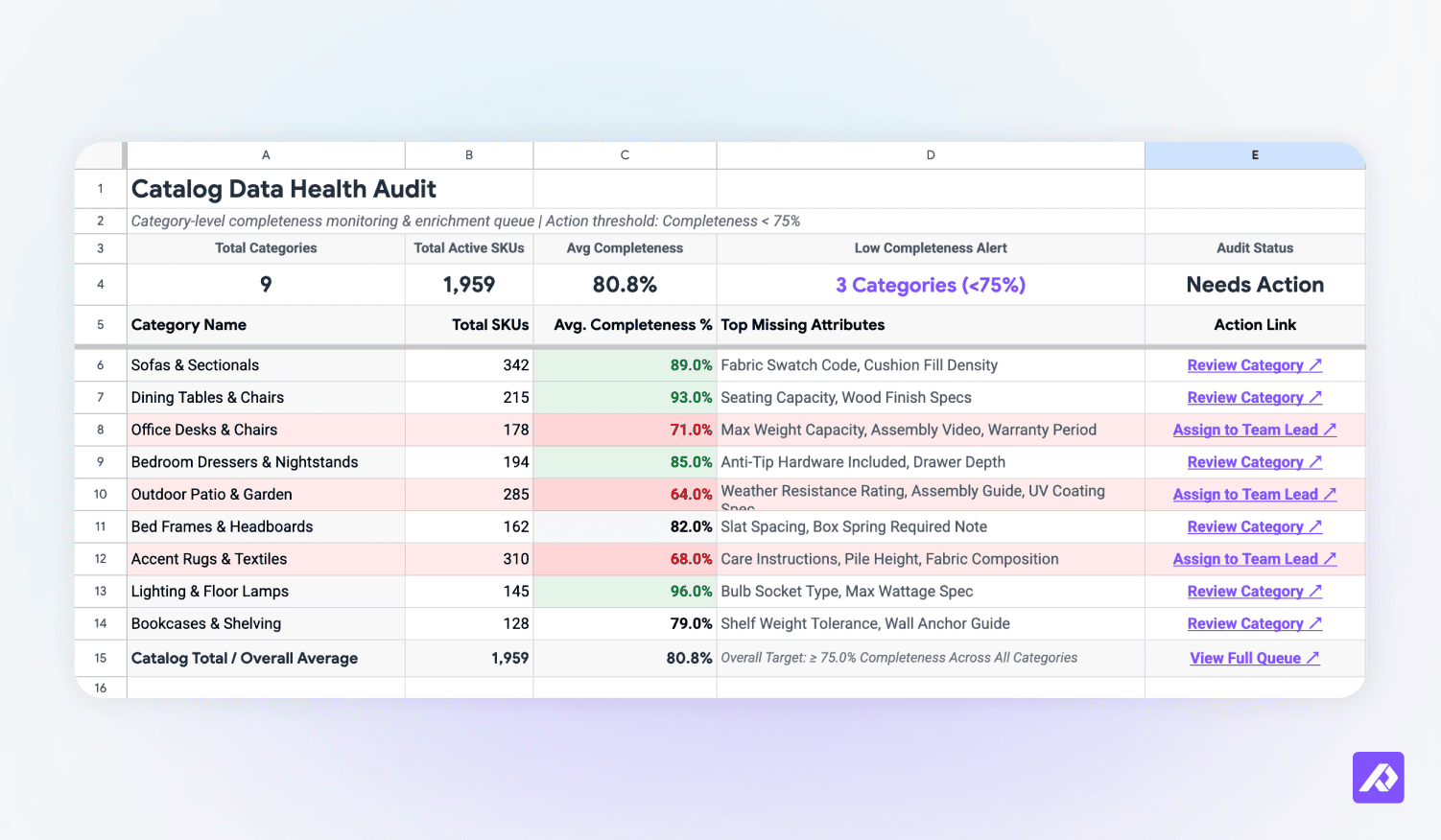
Scenario Logic:
- Schedule Trigger: Runs automatically (e.g., every Monday at 8:00 AM)
- Search: Plytix Search Products queries for SKUs with completeness under 100% or empty fields
- Compile & Notify: Appends missing SKU data into a spreadsheet dashboard and emails a digest to your operations lead
Ready-to-Use AI Prompt:
“Create a scheduled Make scenario that runs every Monday. Search Plytix for all products missing mandatory attributes (like dimensions or completeness under 100%), write those product rows into a Google Sheet, and send an email summary with the sheet link to my product manager.”
Use case #4: Hands-free digital asset intake
How do you automate digital asset intake into your Plytix DAM?
You can automate digital asset intake into your Plytix DAM by using Make to watch cloud storage folders in Google Drive or Dropbox, instantly uploading new photos into Plytix DAM and attaching them to the right product SKU.
When photographers return reshot assets or suppliers deliver new media folders, someone usually has to download files to a local desktop, rename them, and manually re-upload them into Plytix one by one. Storefronts end up displaying outdated visuals simply because manual file management takes too much time.
By connecting your cloud drives directly to Plytix through Make, media intake becomes entirely hands-free. As soon as a photo hits your designated drop folder, Make processes the file, adds it to your Plytix DAM, and links it directly to the matching catalog record.
Scenario Logic:
- Trigger: Cloud Storage (Google Drive / Dropbox) Watch Files in Folder
- Upload Asset: Plytix Upload an Asset module intakes the file straight into your DAM
- Link & Notify: Maps the uploaded file to its SKU in Plytix and sends a confirmation message to Design
Ready-to-Use AI Prompt:
“Build a Make scenario triggered when a new file is uploaded to a designated Google Drive or Dropbox folder. Take that file and upload it into Plytix DAM, attach it to the matching product SKU, and send a confirmation message to my design team.”
Use case #5: AI-powered product onboarding
How do you automate product onboarding from a new SKU to launch-ready in Plytix?
You can automate complete product onboarding from a raw SKU to a launch-ready listing by building a Make scenario that pulls supplier specs, uses OpenAI to draft product copy, updates Plytix fields, and notifies managers for final review.
Onboarding new seasonal collections manually is an exhausting process. Someone extracts technical specifications from a supplier spreadsheet, a copywriter writes marketing descriptions from scratch, a manager reviews the copy in a document, and an ecommerce lead manually pastes everything into Plytix. Doing this across dozens of SKUs delays catalog launches by weeks.
This multi-app workflow eliminates every manual copy-paste step in that chain. Raw supplier data moves straight into an AI engine, draft descriptions write directly back into Plytix, and review tasks are created automatically, allowing you to launch new catalog additions in minutes instead of weeks.
Scenario Logic:
- Trigger & Fetch: Detects a new SKU in Plytix and pulls supplier specs from a spreadsheet
- AI Generation: OpenAI (or your desired AI assistant) generates an SEO-optimized product description from those raw specs
- Update PIM: Writes the AI description and specs directly back into Plytix
- Review & Alert: Creates a review task in your project management app and broadcasts a launch notification upon manager approval
Ready-to-Use AI Prompt:
“Build an end-to-end product onboarding scenario in Make using Plytix. When a new SKU is detected in Plytix, fetch its specs from a spreadsheet, pass those specs to [my preferred AI assistant] to automate product descriptions, update the product record in Plytix with the new text, create an approval task in my task manager, and send a Slack alert when approved.”
Ready to stop chasing product updates manually?Find out how Plytix can automate your product data workflows.
Frequently Asked Questions
Make is a visual, no-code automation platform that links thousands of apps together. When connected to Plytix, Make lets an event in your product catalog (like a status change or missing price) instantly trigger automated tasks, alerts, or report updates across your other business tools.
No developer or coding skills are required. Every scenario, trigger, and filter is built visually inside Make’s drag and drop canvas using plain English rules and pre-built modules.
No. Plytix offers multiple connection paths, including native channels, built-in integrations, and a direct API for custom software builds. However, the Plytix Make integration is the fastest, most flexible path for non-technical managers who want to build custom multi-app workflows without writing code.
To connect your account, open Make, add any Plytix module to your scenario canvas, and follow the connection prompts. You’ll need your Plytix API key and API password, which you can generate inside Plytix by going to Settings → API. For step-by-step instructions, read our Help Center guide on connecting Plytix to Make.