
Every product comes with a pile of details to keep track of: titles, descriptions, specs, images, prices, and stock. They need to be accurate, up to date, and consistent wherever you sell.
Then you add more products, a second sales channel, or a marketplace with its own listing rules. A simple task turns into a tangle of spreadsheets, duplicate entries, and manual updates.
Keeping all of that under control is catalog management. You might do it in a spreadsheet, your ecommerce platform, or a dedicated PIM system. The tools vary, but the goal doesn’t: product data that’s accurate, organized, and ready to sell on every channel.
What is catalog management?
Catalog management is the process of centralizing, optimizing, and distributing product information across every channel where you sell. It covers how product details get in, who keeps them accurate, and what each channel receives.
In practice, it answers three questions:
- Where does our product data live?
- Who is responsible for keeping it accurate?
- How does the right version reach each sales channel?
The goal isn't just a complete catalog. It's making sure every channel gets accurate product information in the format it needs.
Note: "catalog management" means different things in different jobs. Procurement teams, IT service desks, and order management systems all use the term. This guide is about product catalogs for brands, manufacturers, distributors, and retailers.
Product catalog vs. catalog management
These two get mixed up a lot. Here's the difference:
- A product catalog is the collection of products you sell, plus the information that describes them.
- Catalog management is the ongoing work of keeping that information accurate, complete, and up to date.
The catalog is the data. Catalog management is what keeps the data usable.
What is product catalog management?
Product catalog management is catalog management focused on the data that describes your products (also called product information): attributes, variants, images, descriptions, prices, availability, and each channel’s specific requirements.
Today, most of that catalog lives online. Your webshop, marketplace listings, retailer portals, and product feeds are all versions of your catalog, and each one draws on the same product data. A printed or PDF catalog is just one more output.
That changes the job. Product catalog management isn’t about maintaining one master list. It’s about keeping every version of that list accurate and in sync. In practice, that means:
- Adding new products with complete, structured data
- Enriching listings with specs, copy, images, and translations
- Grouping variants so each channel displays them correctly
- Updating prices, stock, and details once, then pushing them everywhere
How are catalog management and PIM related?
Catalog management and product information management (PIM) overlap heavily, and the terms are sometimes used to describe much of the same work. Both involve centralizing, organizing, enriching, maintaining, and distributing product information.
In practice, PIM is often the process and software businesses use to manage their product catalog. Catalog management describes the work itself, while PIM is a broader term for managing product information and the systems that support it.
What's in a product catalog?
A product catalog typically includes product categories, attributes, variants, digital assets, pricing, inventory and availability, and channel-specific product information. Together, these details give customers, sales teams, and commerce channels the information they need to understand, sell, and purchase a product.
| Component | What it includes | Example |
|---|---|---|
| Categories and taxonomy | How products are grouped and organized | Furniture › Living room › Coffee tables |
| Attributes | The details that describe a product | Material, dimensions, weight, color |
| Variants | Different versions of the same product | A T-shirt in five sizes and four colors |
| Digital assets | Images, videos, manuals, certificates, and other files | Main photo, lifestyle shots, spec sheet PDF |
| Pricing | Prices that may vary by market or offer | $49 in the US, €45 in Germany |
| Inventory and availability | Stock levels and product status | In stock, preorder, discontinued |
| Channel-specific fields | Information required by a particular sales channel | Marketplace attributes, GTIN, product category |
How do product catalogs become complex?
Every variant and channel can add more product information to manage. For example, a T-shirt with five sizes and four colors has 20 variants. Each variant may require its own SKU, price, stock level, and product information.
As a catalog grows, keeping all of this information accurate and connected becomes more difficult. That is where a structured approach to catalog management becomes important. It helps teams keep product information complete, consistent, and ready for the channels where they sell.
You can explore some of the key building blocks in more detail with our guides to product attributes, product taxonomy, and digital asset management.
Who uses catalog management?
Any business that creates and maintains a product catalog is doing catalog management. The process might be as simple as maintaining a spreadsheet for a small product range or as complex as managing thousands of products across multiple sales channels.
It commonly involves:
- Brands managing products across direct and retail channels
- Distributors and wholesalers managing information from multiple suppliers
- Manufacturers managing technical specifications, compliance information, and product content
- Retailers and ecommerce businesses selling through a webshop, marketplaces, and other channels
How you manage a catalog depends on how much product information you have and how many people and channels are involved. A small business might manage everything in a spreadsheet. As the catalog grows, keeping that information organized and up to date often calls for more structured processes and software.
You might be relying too much on manual work if:
- You fix the same product detail in more than one place.
- Adding a new channel feels like starting from scratch.
- Nobody’s sure which file or system has the latest version.
- Product launches depend on copying and pasting by hand.
- You can’t easily tell which products are ready for which channel.
What is the catalog management process? The COD framework
The catalog management process can be broken into three stages: Centralize, Optimize, and Distribute. First, you bring product information and assets together. Then, you prepare that information for the requirements of each channel. Finally, you distribute it to the channels where you sell.
The three stages work together as a continuous process. Your central product information stays up to date, channel requirements change, and products move through the process at different times.
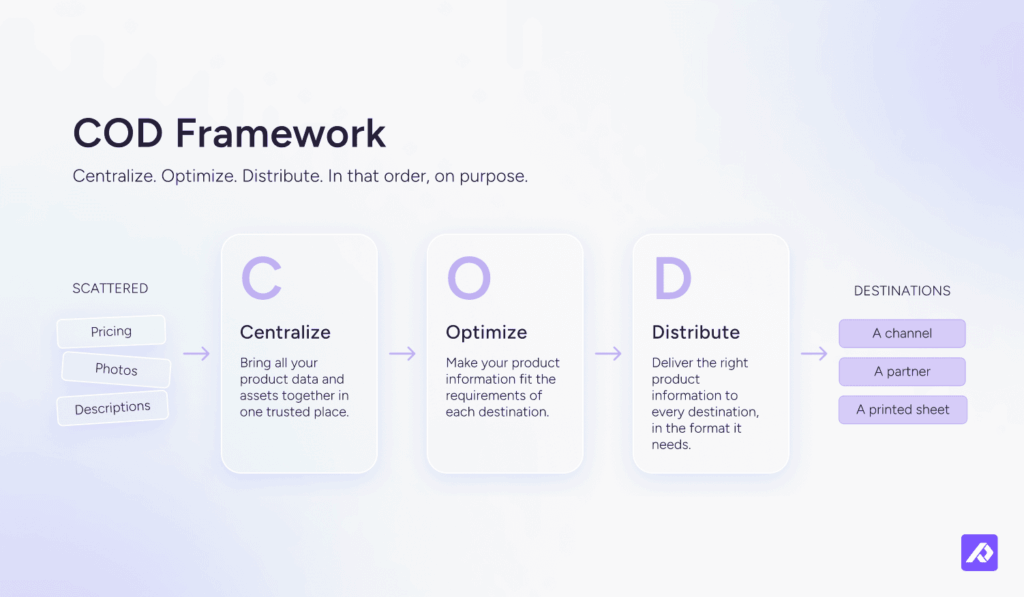
Quick definition: A channel is any place your product information is published or shared. That can include your webshop, a marketplace, a retailer portal, a product feed, or a PDF catalog.
1. Centralize your product information
Centralizing means bringing product information and assets together so your team can work from a reliable system of record.
You don't have to replace every tool you use. What matters is keeping a reliable system of record: one place where your team manages product information, and where every channel gets its data.
To centralize:
- Check supplier files before you import. Catch renamed columns, missing values, and broken barcodes before they overwrite good data.
- Map your sources. List where your product data and assets live today, and who manages them.
- Agree on a structure. Use consistent attribute names, categories, and links between products and their variants.
- Bring it together. Move your product data into one central system, with images and files attached to the products they belong to.
- Stop maintaining duplicate copies. Once your data is in one place, stop updating the same information in spreadsheets and shared folders. Other systems can still feed data into your central system, but updates should happen in one place. Your ERP can stay the master for SKUs, prices, and stock.
- Assign ownership. Give each key field, such as pricing, descriptions, specifications, and imagery, a person or team responsible for keeping it accurate.
2. Optimize your product information
Optimizing means enriching and adapting your product information so it meets each channel's requirements, gets found in search and AI answers, and gives shoppers what they need to buy.
A product can be complete in your system of record and still not be ready for a specific channel. One marketplace might require certain attributes, another might have different image rules, and your webshop might give you more freedom.
Readiness is always channel-specific: a product can be ready for Amazon without being ready for Google Shopping. Meeting the rules is the starting point. Good product information also helps shoppers find, understand, and choose your products.

For example, one product might need a different title for Amazon, Google Shopping, and your webshop. The underlying product information stays the same. Only the version each channel sees changes.
To optimize:
- Pick a channel. Start with the one you’re about to launch, or the one causing the most problems.
- Document its requirements. Write down what the channel needs, from required fields and identifiers to content and image rules.
- Check readiness. Compare your products against those requirements to see what’s ready and what’s missing.
- Fill the gaps. Add missing specifications, translations, and images to your system of record so your product information is ready for the channels you sell on.
- Write for search, AI, and shoppers. Use the terms people search for, lead with the details buyers care about, and keep attributes structured so search engines and AI assistants can understand them. You don’t need a separate “AI version” of your catalog.
- Create channel versions only where needed. Adapt titles, descriptions, or attributes when a channel’s rules or customers call for it. Everything else stays shared.
- Validate before you send. Make sure each product meets the channel’s requirements before it goes live.
3. Distribute your product information
Distributing means getting your optimized product information to every channel from your system of record and keeping it up to date as things change.
Sending data to one channel is easy. Keeping 12 channels accurate at once is not. The goal is to stop rebuilding product information every time you add or update a channel. When every channel gets its data from the same system of record, adding another channel gets easier.
Channels aren't just webshops and marketplaces. Partner portals, product feeds, spec sheets, and digital or printed catalogs all count.
To distribute:
- List your channels. Include the easy-to-forget ones, like retailer templates, distributor spec sheets, and PDF catalogs.
- Connect where you can. Use feeds or integrations when they’re available. For the rest, export directly from your system of record so nobody has to copy and paste data by hand.
- Match your fields. Make sure your attribute names and formats line up with what each channel expects. Your “Shade” might be their “Color.”
- Set an update schedule. Prices and stock may need daily or live updates. Descriptions and images can be updated less often.
- Fix problems at the source. If a channel rejects a product, fix the data in your system of record and send it again. That way, you don’t have to fix the same problem in every channel.
- Keep track of channel changes. Requirements can change, so make sure someone is keeping an eye on them.
What happens when you add a new channel?
Go back to Optimize. Your central product information is already in place, so you only need to prepare it for the new channel's requirements and then distribute it.
A catalog management process is working well when:
- A product change only needs to be made once.
- You can see which products are ready for each channel.
- New channels require less manual work to launch.
- Errors are fixed in the central record rather than separately in every channel.
What are the challenges of catalog management?
The biggest catalog management challenges are keeping product information accurate, managing product variants, and maintaining consistent data across sales channels and teams.
As your catalog grows, keeping everything up to date gets harder. Product information can become inconsistent, channel requirements can change, and teams can struggle to keep data accurate across systems.
Here are five common challenges and how they affect your business.
1. Keeping up with changing channel requirements
Every sales channel has its own product data requirements, and these can change over time.
Marketplaces and shopping platforms may update their rules for product titles, images, attributes, and identifiers. For example, Google's image requirements will introduce a minimum product image size of 500 × 500 pixels on January 31, 2027.
This means catalog management is an ongoing process. You need to review and update product information regularly to keep listings accurate and meet each channel's requirements.
2. Managing product variants
Every additional size, color, or material creates more product data to manage.

For example: an office chair offered in three frame colors, four upholstery fabrics, and two armrest options has 24 variants. Each one needs its own SKU, but the rest of the data doesn’t line up neatly: price changes with the fabric, images change with the color and fabric, and shipping weight changes with the armrests. Keeping that straight means tracking which attributes are shared across variants and which are specific to one.
And then things get even more complicated when each channel handles variants differently:
- Amazon: Uses parent and child listings to group related variations.
- Shopify: Organizes product options and variants within a product listing.
- Google: Uses shared identifiers and supports ProductGroup structured data to help search engines understand product variations.
The challenge is keeping product information consistent while adapting it to each channel. Without a structured approach, teams can end up duplicating data, making errors, and spending too much time updating listings.
3. Keeping teams aligned on product data
Product data often has multiple owners. Marketing may manage descriptions, ecommerce teams may handle channel content, and other teams may be responsible for pricing, inventory, or technical specifications.
Without clear ownership, information can become outdated or inconsistent. Teams may update the same fields differently, or important changes may get missed altogether.
The solution starts with clear responsibilities. Each key data field should have an owner and a defined process for updating and approving changes.
That way, everyone knows who is responsible for keeping product information accurate.
4. Finding reliable information across systems
Product information often lives in multiple places, including ERP systems, spreadsheets, supplier files, ecommerce platforms, and shared drives.
When different systems hold different versions of the same information, it's hard to know which one is correct.
For example, if a product's weight differs across three systems, someone has to check the records, confirm the right value, and update the relevant listings. Multiply that across thousands of products, and manual checks quickly become a drain on time.
Centralizing product information helps create a reliable view of each product. Teams can work from consistent data while existing systems continue to manage the information they're responsible for.
5. Preventing poor product data from hurting performance
Inaccurate or incomplete product information can lead to returns, wasted time, and frustrated customers. It can also make it harder for teams to work efficiently and deliver a consistent buying experience.
The impact is measurable:
- Product returns: In a 2025 survey, 60.4% of German shoppers said they’d returned an item because its description or images were inaccurate.
- Data quality costs: Gartner estimates that poor data quality costs organizations an average of at least $12.9 million per year.
- B2B buying experiences: Gartner’s research found that 69% of B2B buyers had encountered inconsistencies between a supplier’s website and its sales representatives.
The takeaway is simple: product data quality affects more than your catalog. It influences customer trust, purchasing decisions, returns, and day-to-day operations.
As your catalog expands, maintaining that quality becomes harder without a clear process.
How can you overcome catalog management challenges?
Start by creating a consistent way to manage product information. Give teams clear ownership, centralize product data, and establish processes for reviewing and updating information across sales channels.
A structured catalog management process helps you reduce errors, avoid duplicate work, and keep product listings accurate as your business grows.
The goal isn't just to keep your catalog up to date. It's to make product information easier to manage, more reliable, and ready to use wherever you sell.
What are the best practices for catalog management?
Good catalog management starts with clear data standards, accurate product information, and a consistent process for keeping everything up to date.
The goal is to make product data easier to manage, reduce errors, and ensure your listings meet the requirements of each sales channel. These six best practices can help.
1. Set clear data standards
Decide what good product data looks like before adding products to your catalog. Define which fields are required, how product names should be written, which units to use, and how identifiers, images, and translations should be managed.
Clear standards help prevent missing information and inconsistencies from spreading across your catalog.
2. Check product readiness for each channel
A product can have complete information overall and still be missing something a specific channel requires.
Check product readiness separately for each destination. This helps you identify which products are ready to publish and what needs fixing before they go live.
3. Treat product images as part of your catalog data
Product images need the same attention as descriptions, specifications, and other product details. They also affect whether people buy. A Cornell study found that handbags with better-quality photos were up to 1.25 times more likely to sell in the listings studied.
Each channel has its own image rules, too. Google, for example, explains how product images support merchant listing structured data and recommends providing multiple images where possible.
All of this is easier when images live with the products they belong to. A digital asset management (DAM) system keeps images, videos, and documents linked to the right product, so each channel gets the right version.
4. Keep product content clear and consistent
Write product descriptions that help customers understand what they're buying. Use clear language, consistent attribute names, and specific details. Keep prices, availability, identifiers, and images accurate, too.
Well-structured product data also helps search engines interpret your listings. For example, Google's structured data guidance explains how product information can support search results featuring details such as price and availability.
The same principle applies to AI-powered search and shopping. You don't need a separate version of your catalog for AI. You need accurate, complete, well-structured product information that different platforms can understand and use.
5. Automate repetitive tasks
Updating product information manually takes time, especially when the same changes need to reach multiple channels.
Use automation to fill in fields, flag missing information, validate data, and distribute updates. Keep people involved when a task requires product knowledge, brand judgment, or a decision that rules alone can't handle reliably.
This helps reduce repetitive work while keeping important decisions in the right hands.
6. Review product data regularly
Product information can become outdated as products change and channel requirements evolve. Regular reviews help catch problems before they affect customers or prevent listings from being published.
Check for missing attributes, outdated specifications, incorrect product relationships, broken images, and changes to channel requirements. Set a review schedule that reflects how often your products and sales channels change.
The result is a more reliable catalog, fewer avoidable errors, and product information that's ready to use across your sales channels.
What is catalog management software?
Catalog management software is a system that helps businesses organize product information, keep it accurate, and prepare it for different sales channels.
Instead of managing product details across spreadsheets and separate systems, teams can use one central place to maintain product data and get it ready for publishing.
A catalog management system typically helps you:
- Centralize product data: Keep descriptions, specifications, images, and other product details together.
- Manage product variants: Organize different sizes, colors, materials, and other variations.
- Maintain data quality: Identify missing information and check product data against defined requirements.
- Manage digital assets: Keep product images and other files linked to the right products.
- Prepare data for each channel: Adapt product information to the requirements of marketplaces, retailers, and ecommerce platforms.
A product information management (PIM) system is one type of catalog management solution. It's particularly useful when product information becomes too complex to manage across spreadsheets, teams, and multiple sales channels.
Is a spreadsheet, ERP, ecommerce platform, or PIM best for catalog management?
The right option depends on how complex your product data is, how many people manage it, and where you sell.
Each system serves a different purpose:
| System | Best for | Main limitation |
|---|---|---|
| Spreadsheets | Small catalogs and simple workflows | Harder to maintain consistent data as teams, variants, and channels increase |
| ERP | Managing inventory, pricing, orders, and financial data | May not provide the flexibility needed for product content and channel-specific requirements |
| Ecommerce platform | Managing products for your own online store | May be less suited to managing product information across multiple external channels |
| PIM | Managing detailed product information across teams and sales channels | May be more than a small, simple catalog needs |
Spreadsheets can handle substantial amounts of data. For example, Google Sheets supports up to 10 million cells. The challenge isn't necessarily the amount of data. It's keeping everything accurate, consistent, and organized as more people, product variants, and sales channels get involved.
If you're still using spreadsheets, see our guide to building a product database.
When manual processes become difficult to maintain, a PIM can give your team a more structured way to manage product information.
With Plytix PIM, teams can be up and running in less than a week. If you're deciding which solution is right for your business, our guide to the best PIM software can help you compare your options.
What does catalog management look like with PIM software?
PIM software helps businesses manage product information in one central place, keep it accurate, and share it across sales channels without repeating manual work.
Plytix customers have used PIM to spend less time preparing catalogs, improve product data quality, and get products to market faster.
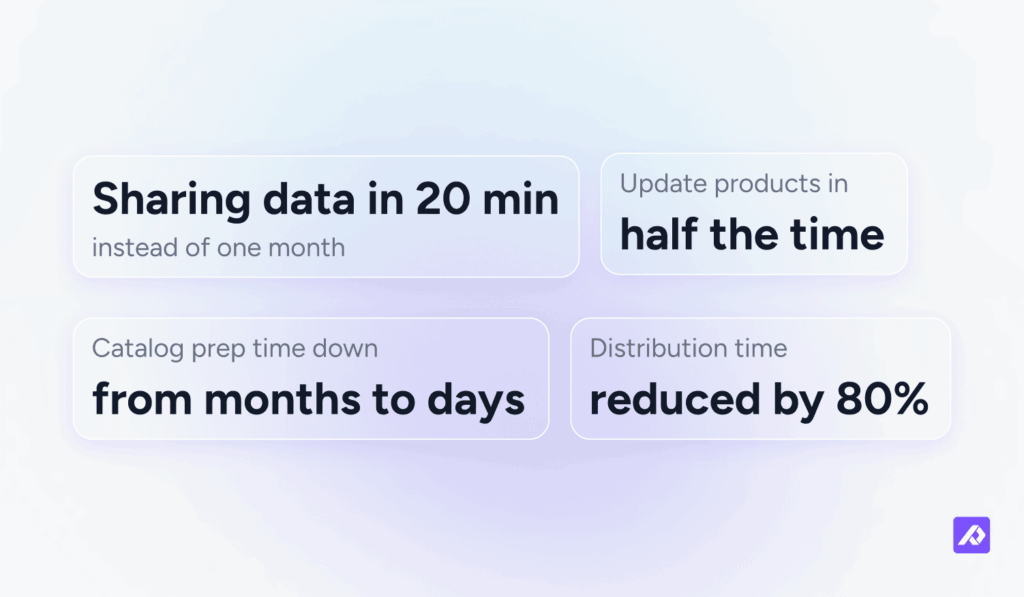
Alltrade Tools: Sharing product data in 20 minutes instead of a month
Alltrade Tools reduced the time needed to share 800 SKUs with Summit Racing from a month to around 20 minutes. With product information in one place, the team no longer had to spend weeks gathering details and preparing files manually.
"A job like sharing 800 SKUs with Summit Racing, which took me a full month when I first arrived, takes me 20 minutes now."
— Leah Hall, Content Manager and Digital Marketer, Alltrade Tools
Tunturi: Cutting product update time in half
Tunturi struggled to maintain consistent product information across multiple spreadsheets. By bringing its product data together in Plytix, the company cut update time in half and brought products to market twice as fast.
Otter Distribution: Managing richer product information
Otter Distribution needed to manage product information across four websites. With Plytix, the company increased the number of attributes per SKU from six to around 15 and reduced the time needed to distribute product data to sales channels by 80%.
Universal Components: Reducing catalog preparation from months to days
Universal Components manages more than 16,000 products. Previously, preparing a catalog took two people 12 months. With Plytix, the team can now complete catalog preparation in days and update product information more easily.
PIM takes much of the manual work out of catalog management. With less time spent managing product data, teams can focus more on getting products ready for market.
How AI is changing product content and discovery
AI is changing catalog management in two main ways: helping teams create and improve product content, and giving shoppers new ways to discover products. Both rely on the same foundation: accurate, complete, well-structured product information.
AI helps teams create and enrich product content
AI can speed up many catalog tasks. Depending on the tools they use, teams can generate product descriptions, suggest attributes, categorize products, translate content, and adapt product copy for different sales channels. Plytix AI helps teams put AI to work on product content.
But faster content creation doesn't automatically mean better content. AI works best when it has reliable product information to draw from, and human review is still important to catch errors and maintain brand consistency.
AI is becoming another way shoppers discover products
Shoppers can increasingly use AI tools to research products, compare options, and find items that match their needs. For example, ChatGPT can use structured product feeds to help shoppers discover products, while Google's AI-powered shopping experiences also draw on merchant product data.
This means your catalog needs to support more than your ecommerce store and traditional marketplaces. Product information also needs to be clear and structured enough for AI systems to interpret accurately. This shift toward AI-led shopping is part of the wider move to agentic commerce.
The shift is already showing up in traffic data. Adobe reported that visits from AI sources to US retail sites grew 393% year over year in the first quarter of 2026. Its analysis also found that product pages scored just 66% for machine readability, leaving room for retailers to make their product information easier for AI systems to understand.
Getting started with better catalog management
Good catalog management starts with reliable product information and a clear process for keeping it accurate, complete, and ready for every sales channel. Centralize your data, optimize it for each destination, and distribute it without creating more manual work.
The right setup depends on your catalog. Spreadsheets may be enough for a small product range, while growing catalogs often need a more structured system to manage product data, teams, and channels. As AI creates new ways to manage content and help shoppers discover products, having accurate, well-structured product information becomes even more important.
If managing your catalog is taking too much time or making it harder to launch and update products, a PIM can help. With Plytix, you can bring product information together and get your catalog ready for every channel, with less manual work.
Frequently Asked Questions
Catalog management in ecommerce is the process of keeping product information accurate, complete, and consistent across the online channels where you sell. That includes titles, descriptions, attributes, variants, images, prices, stock, and channel-specific requirements. The goal is to make sure each product page, listing, and feed has the right information for that channel.
Catalog management on marketplaces means maintaining product information according to each marketplace’s requirements. That can include title limits, required attributes, identifiers, image requirements, and variant structures. Because each marketplace has its own rules, the same product may need to be adapted for each one.
A product catalog is the set of products you sell and the information that describes them. A PIM (product information management) system is software for managing that information: it centralizes product data, optimizes it, and distributes it to every channel. The catalog is the content. The PIM is where you manage it.
Yes. Product catalogs are still central to commerce, but they are no longer limited to printed or standalone digital catalogs. Product information now appears across webshops, marketplaces, retailer portals, product feeds, and AI-powered shopping experiences. Each destination needs accurate product data that can be adapted to its requirements.
Measure product catalog quality against the requirements of each channel rather than relying on one overall completeness score. Useful measures include:
- The percentage of required fields completed for each channel
- The percentage of products that pass each channel’s validation checks
- The number of rejected listings
- The time it takes to launch a new product
- The time it takes to update product information across channels
A product can be complete in your central catalog and still be missing a field required by a particular marketplace. Measuring channel readiness shows you what needs to be fixed before publication.
A catalog manager keeps product information accurate, complete, structured, and ready for distribution. The role can include setting data standards, managing product enrichment, maintaining taxonomy and attributes, fixing data quality issues, monitoring channel requirements, and supporting product launches.
In smaller teams, these responsibilities may be part of an ecommerce manager’s or product manager’s role rather than a dedicated catalog management position.
The time needed to set up catalog management software depends on the software, the size of the catalog, and the condition of the existing product data. With Plytix, teams can get started in less than a week. Cleaning, structuring, and enriching existing product data is a separate process, and the time required depends on how organized and consistent that data is.