Ask any PIM vendor if they have AI and you'll get a yes before you finish the sentence. Ask what it does with a half-empty product record, and the answers get more interesting. This guide covers what AI in product information management (PIM) software does today, what to look for, and how to choose a tool.
What is an AI PIM?
An AI PIM is product information management (PIM) software with artificial intelligence built in. A PIM is the central place where you store, organize, and share product data. The AI writes descriptions, translates content, edits images, and flags missing or inconsistent data inside the catalog itself.
A chatbot gives you text to paste back field by field. AI in a PIM reads your attributes, writes to the right field for each variant and language, and lets you review the result first.
For the basics of the category, see this guide to product information management, or how PIM compares with PXM.
What AI features do PIM systems have?
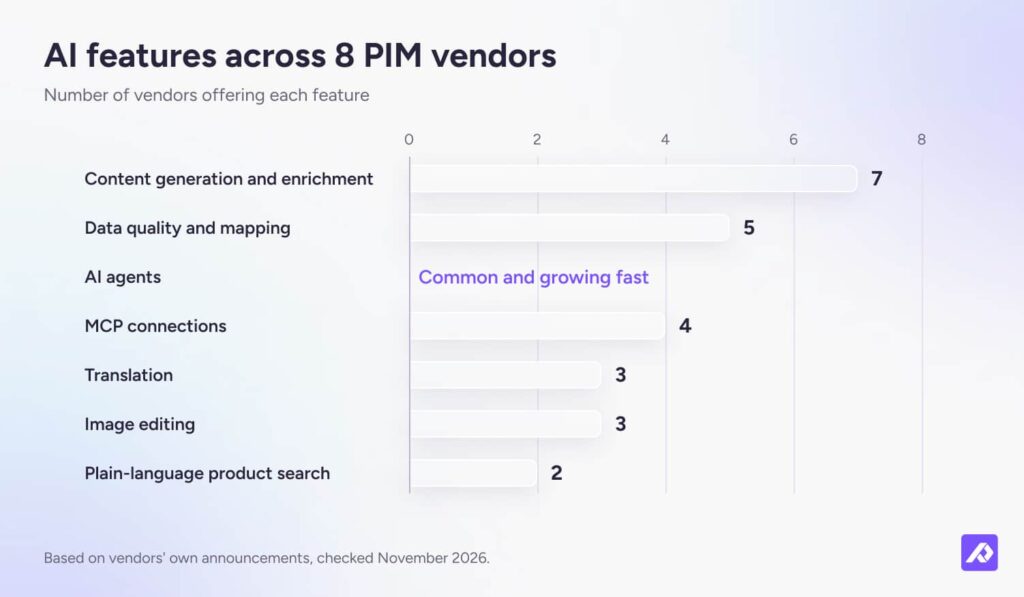
The most common AI feature in PIM systems is content generation and enrichment, followed by data quality checks and mapping. Translation and image editing are common. AI agents, MCP connections, and plain-language product search are newer.
If you're comparing AI catalog management software, these are the features to look at. We checked eight PIM vendors' release notes, product pages, and press releases in November 2026. A vendor not counted for a feature may still offer it.
You'll also see PIMs labeled "AI-native" or "agentic." There's no agreed definition for either, so judge each tool by what its AI does with your data.
AI product data enrichment
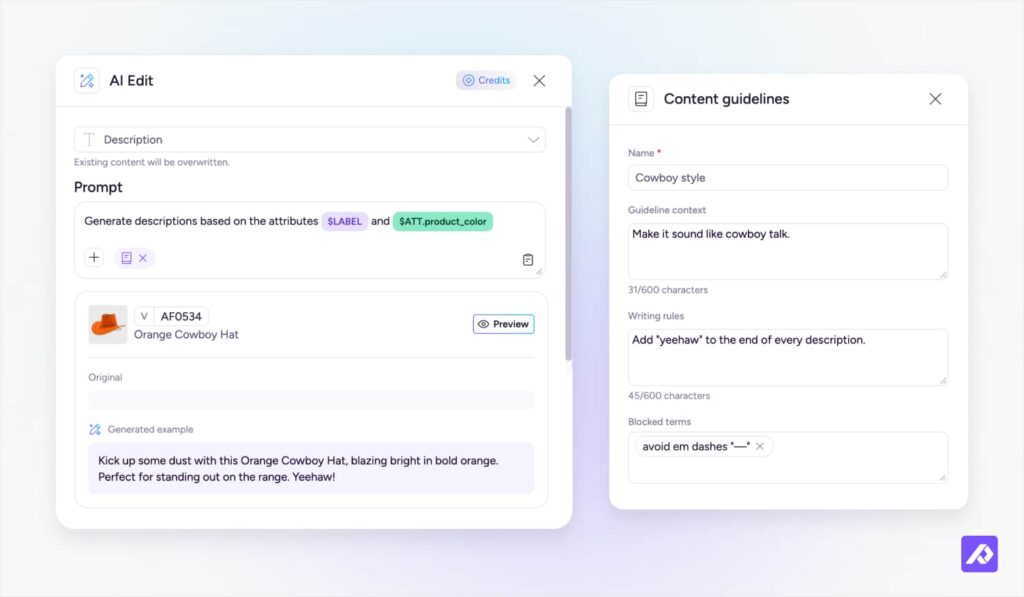
AI product data enrichment uses the attributes you already store to write or improve product content, like descriptions, titles, and tags. Most teams start here, because thin descriptions are easy to spot.
What it does: It writes and rewrites copy for many products at once, from the facts in each product record, with a version for each variant and channel.
What to look for:
- Copy written from your product attributes, not from a blank prompt
- Saved brand rules (tone, writing rules, and blocked terms) that apply every time
- Character limits that match each channel
Don't fall for: A polished demo on a well-filled product. Give it a product with sparse attributes instead. A good tool writes from the facts it has and leaves the rest blank. A weak one fills the gaps with confident guesses.
Data quality and mapping
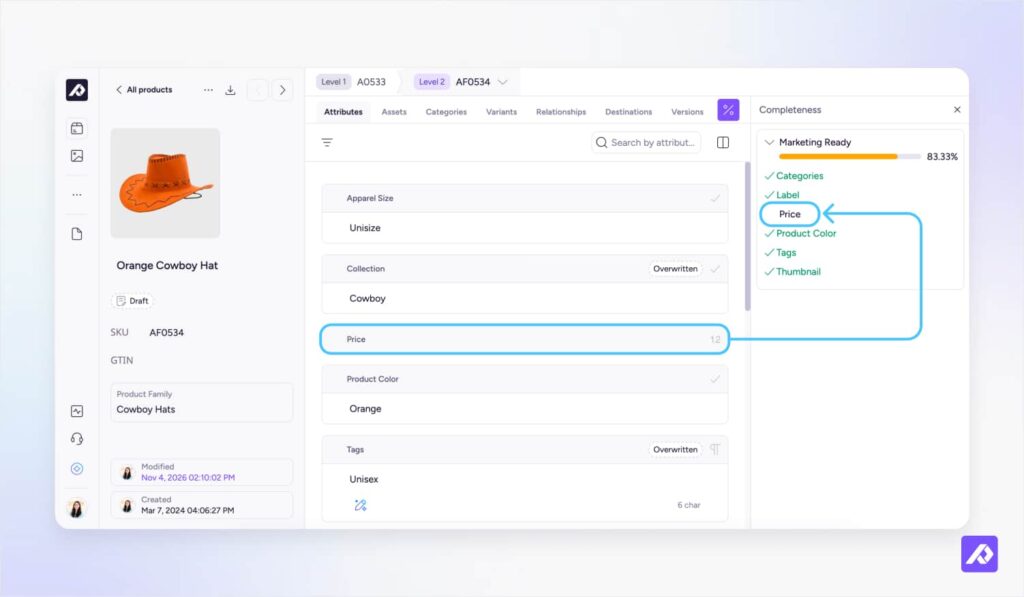
AI for data quality in a PIM scans your catalog for missing values, inconsistent formats, and products in the wrong category, then suggests fixes. Some PIMs also use AI to map incoming spreadsheets to the right attributes.
What it does: It finds the gaps and inconsistencies a person would miss across thousands of rows, and shows you what to fix first.
What to look for:
- Suggested fixes you approve before anything changes
- A clear reason for each flag, like a required attribute missing for a channel
- Mapping you can check and correct when a new file comes in
Don't fall for: "Fixes your data automatically." Ask what happens when the AI gets it wrong, and how you'd find out.
AI translation
AI translation in a PIM turns your product content into every language you sell in, for hundreds of products at once, without exporting anything to a separate translation tool. Someone who knows each market should still check the result, especially technical terms.
What it does: It puts each translation in the right field for each language, so it's ready to export to every channel.
What to look for:
- Brand and product names that stay untranslated
- Numbers and units that come through unchanged
- A review step for each language before anything goes live
Don't fall for: "100+ languages." Ask to see your most technical product in your two main languages.
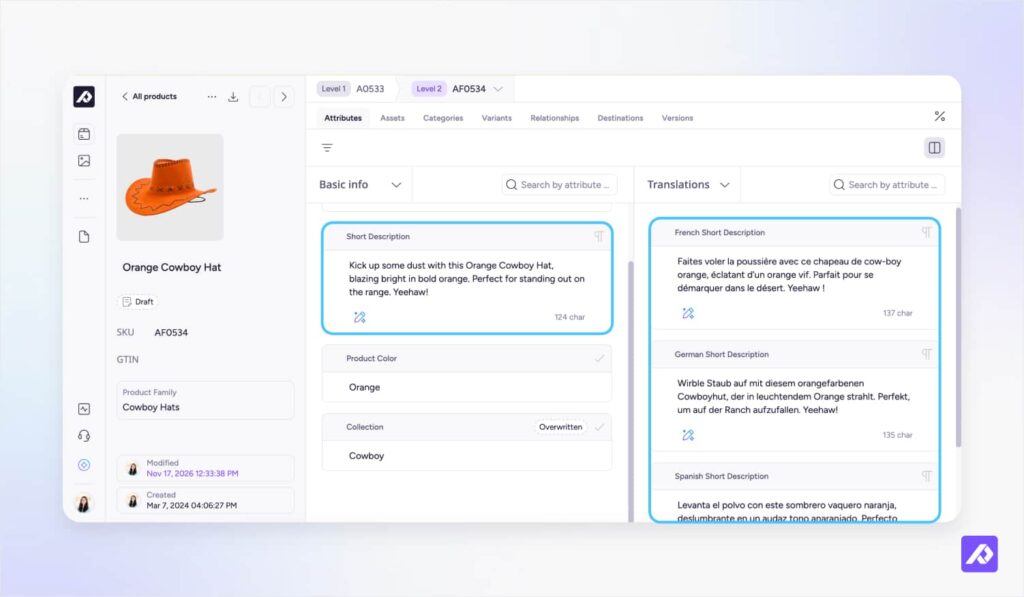
Image editing
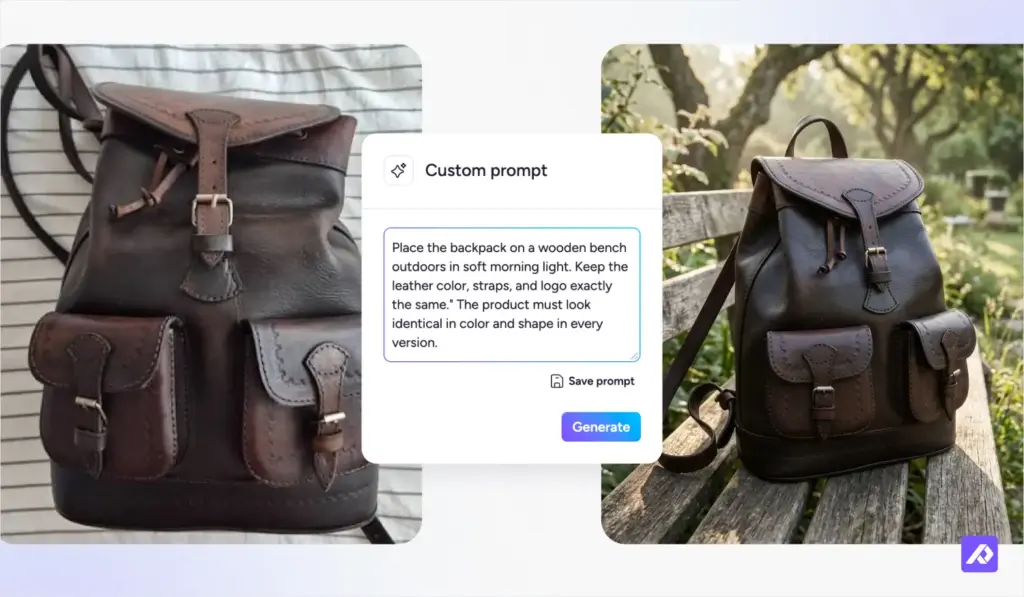
AI in a PIM can remove or replace backgrounds, relight product shots, upscale low-resolution files, and resize images for each channel.
What it does: It takes on image prep for marketplaces and retailers, which is slow, repetitive work. Some tools also turn a basic pack shot into a staged product image.
What to look for:
- Edited images saved as new files, with the original kept
- Output that meets each retailer’s size and background rules
- Alt text written for each image
Don't fall for: A lifestyle scene that looks great but changes the product's color or shape. Check the product as closely as the background.
Plain-language product search
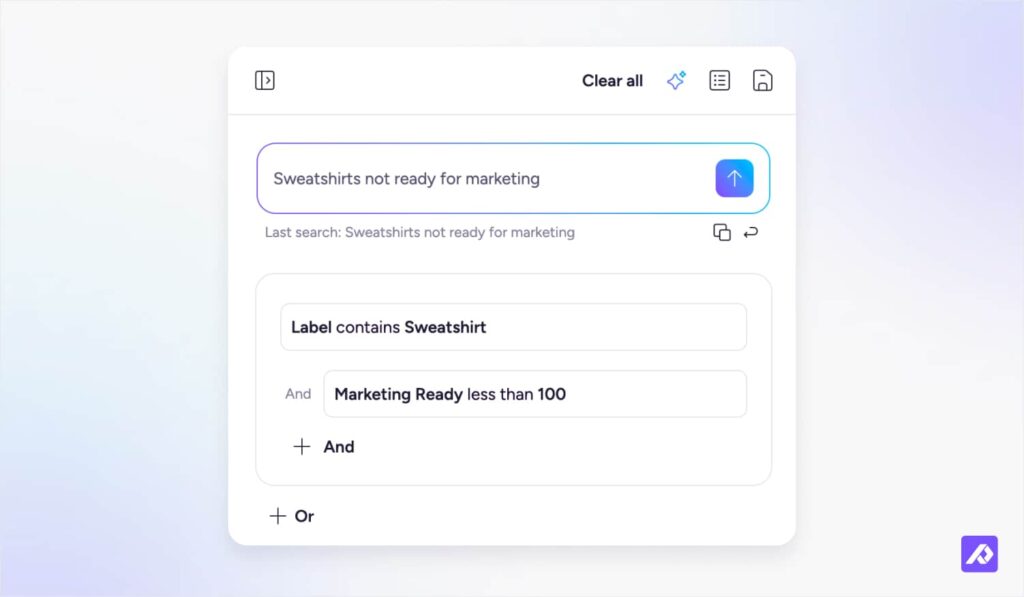
Plain-language search lets you find products in a PIM by describing them, instead of building filters by hand.
What it does: It turns a request like "blue jackets without a size chart" into a filter, so anyone on the team can find the products that need work.
- Requests that combine attributes and gaps, like “products in one category with no image”
- Results that match what you’d get from a filter built by hand
Don't fall for: A search box that only matches product names. Test it with a request that mentions missing data.
AI agents and MCP connections
AI agents carry out multi-step tasks in a PIM, such as creating products, enriching them, and preparing them for a channel. Model Context Protocol (MCP) is an open standard that connects outside AI tools, like Claude or ChatGPT, to your PIM under your permissions. Depending on the vendor, that can go well beyond editing product data, into setting up and managing the PIM itself.
What it does: Agents run whole jobs instead of single edits. MCP lets your team work in the PIM through the AI tools they already use, from quick updates to bigger setup work.
What to look for:
- A clear list of what a connected tool can change, from product data to the PIM’s setup
- An approval step before changes go live
- Permissions you set for each user or tool
Don’t fall for: “Agentic” on a feature page. Ask the vendor to show one task an agent completes from start to finish.
Do you need clean product data before using AI?
No. The facts need to exist somewhere, but they don't have to be clean or consistent first. "Garbage in, garbage out" assumed every fix had to happen by hand.
A website rebuild shows the difference. Teams often find out mid-migration that hundreds of products have no description and sizes are written three different ways. Fixing that by hand takes weeks, so the mess often moves as it is. In a PIM with AI, gaps are flagged first, values are standardized across every SKU, and missing descriptions are written from the attributes you have, before anything moves.
AI still can't invent facts. If nobody recorded a product's material, AI shouldn't guess it.
Why do you still need product data experts?
You still need people who know ecommerce, because AI makes changes fast and someone has to decide which ones are right, which products come first, and what each channel needs.
Speed is the easy part. Deciding which products to fix first, what each channel needs, and when AI copy is good enough to publish takes someone who has done it before.
Plytix is a team of ecommerce experts as well as a software company. The team helps customers decide where to start, how to structure attributes, and which rules to set. Customers rate Plytix support 9.7 out of 10 on G2.
That's why AI features in a PIM need to be designed responsibly and thoughtfully: working from your product data, showing every change before it goes live, and leaving the judgment calls to your team. Anything else is hype.
How do you choose AI PIM software?
To choose AI PIM software, test each AI feature on your own product data, then compare pricing, data handling, connections, and support.
On a vendor shortlist, AI often shows up as a yes-or-no checkbox. That hides the questions that matter: what the AI works from, what it's allowed to change, and who checks its work.
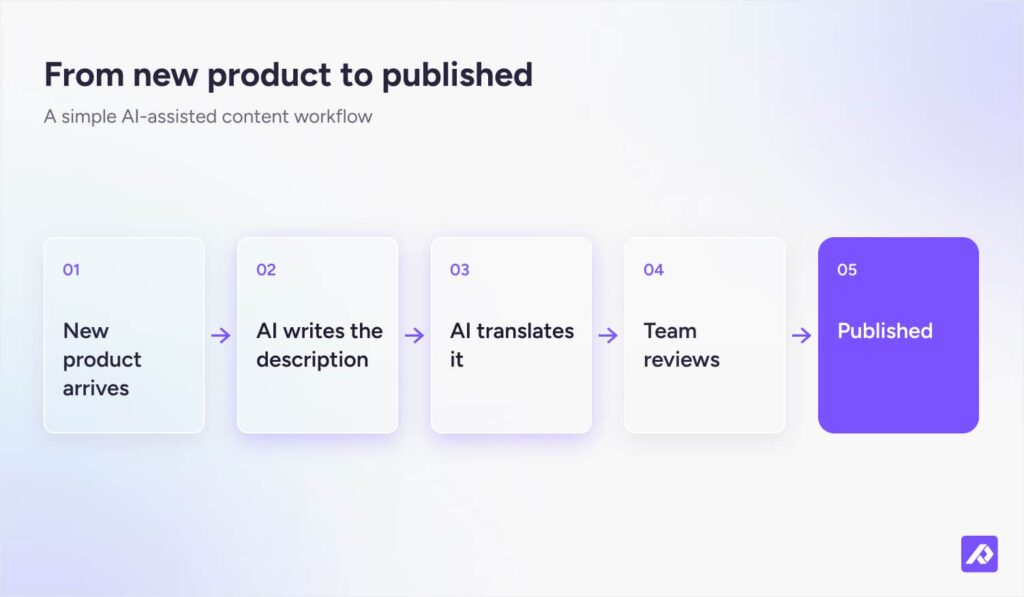
Check that AI can run inside automations. If someone has to open each product and click a button, the AI writes faster, but your team still runs the process. The real time saving comes when a rule starts the AI for you. A new product arrives, its description is written and translated, and it waits for review. Ask each vendor which AI actions their automations can run.
| What to check | What to ask the vendor |
|---|---|
| Works from your attributes | "Does AI write from our product attributes, or from a blank prompt?" |
| Pricing model | "Is AI included, credit-based, or a paid add-on?" |
| Data handling | "Where is our data processed, and is it used to train models?" |
| AI in automations | "Which AI actions can your automations run without someone starting them?" |
| Connections | "Do you offer an API or MCP connection?" |
| Expertise and support | "Who helps us set this up, and what does that cost?" |
To compare specific vendors, see the guide to the best PIM software.
How do you get started with AI in a PIM?
Start with one channel and your best-selling products, then expand once the output meets your standard.
- Pick one channel and your best sellers. Better data pays off fastest there.
- Run a gap check. Let AI flag missing attributes, descriptions, and images.
- Set your rules. Save Brand Guidelines and channel limits first.
- Test on a few products. Review the output and adjust the rules.
- Roll out and spot-check. Expand to the full catalog and keep reviewing samples.
Is an AI PIM worth it?
An AI PIM is worth it if you have more product content to write and check than your team can handle by hand. It helps most when the catalog grows fast or you launch on a new channel, because hundreds of products suddenly need copy, translations, and images. It helps less with structural work, like mapping a retailer's template or moving to a new ERP, where the PIM's setup does the heavy lifting.
Frequently Asked Questions
The best AI PIM software for ecommerce writes from your product attributes, lets you review changes before they publish, and has clear AI pricing. Plytix AI, Akeneo, Salsify, and Inriver all offer AI enrichment. Test each one on your own product data before you decide.
Before AI writes anything, a PIM should check that your product data is AI-ready: required attributes filled for each channel, consistent units and values, and the right images attached. Flagging those gaps first means AI writes from real product facts instead of guessing, and your team fills in what only a person knows.
Often, yes. Most vendors charge for AI through credits, usage, or a paid add-on. Plytix AI includes 500 free AI credits a month on every plan, and the Plytix AI Unlimited add-on gives unlimited use (Plytix).
It can be, but check with each vendor. Ask where your data is processed, which AI models they use, and whether your data trains those models. A good vendor answers all three in writing.