What is a PIM for Shopify?
A Shopify PIM is a product information management system that connects your product catalog to Shopify. It gives you one place to manage titles, descriptions, images, variants, and more.
What makes it different from a regular PIM?
Every PIM handles product data. A Shopify PIM just happens to be really good at it for Shopify specifically. It knows how Shopify works, so your product data moves from the PIM to Shopify on its own. No manual updates. No CSV imports.
And it doesn't stop at Shopify. The same information can be adapted and sent to marketplaces, retailer portals, and other channels too.
The result: Shopify remains a powerful sales channel, while the PIM manages the complexity behind your catalog.
What to look for in a Shopify PIM
The best PIM for Shopify is not just a good PIM. It needs to handle Shopify's specific data model, workflows, and limitations. Here are the six things that actually separate a Shopify-native PIM from one that's been adapted for it.
1. Shopify integration type
There are three ways a PIM connects to Shopify: a native App Store app, a vendor-built connector, or a third-party integration.
Native App Store apps stay current with Shopify's API automatically. No extra vendor to manage, no lag when new features ship.
Connectors add a dependency that tends to show up at the worst possible time.
2. Time to first sync
Some PIMs are live within a day. Others take weeks of onboarding or a full implementation project. That difference is worth knowing before you're stuck waiting. It's also a good signal of whether the platform was built for non-technical teams.
3. Shopify-specific feature depth
Basic product fields are table stakes. What separates a Shopify-built PIM from a general one is support for advanced metafield types, multi-store management from one catalog, Shopify Markets and translation workflows, and completeness scoring before anything goes live.
4. Total year-one cost
The subscription is only part of what you pay. Setup fees, implementation partners, and connector maintenance all add up. A lower license price with a required implementation partner often costs more than a self-service platform at a higher tier.
5. Verified Shopify feedback
G2 reviews tell you about overall PIM satisfaction. App Store reviews tell you specifically how the Shopify integration holds up, written by actual Shopify merchants. When a vendor has App Store reviews, read them. When they don't, that's worth noting.
6. Free access to test with your real catalog
A demo uses sample data. A free plan or trial lets you import your actual catalog, map your real fields, and see how the platform handles your specific products before you spend anything.
Shopify PIM comparison at a glance
Here's how six Shopify PIMs compare on what Shopify merchants ask about first: how each one connects to Shopify, how fast you can go live, what it actually costs in year one, and whether you can try it before you commit.
| PIM | Best for | Integration | Setup time | App Store rating | Year-one cost | Free plan |
|---|---|---|---|---|---|---|
| Plytix | Best overall | Native App Store app | Self-service, same day | 4.6/5 (9 reviews) | Free to ~$9K* | Yes |
| Sales Layer | Multichannel & B2B | Native App Store app | Guided, 1–2 weeks | Listed, no reviews | ~$12K+ | No |
| Pimberly | Enterprise PIM + DAM | Native App Store app | Assisted, weeks | 5.0/5 (3 reviews) | ~$36K+ | No |
| Quable | Global & multilingual | Native App Store app | Assisted, weeks | 5.0/5 (1 review) | ~$21K+ | No |
| Akeneo | Large enterprise catalogs | App + third-party | Partner-led, months | 5.0/5 (1 review) | ~$35K+ | No |
| Pimcore | Developer-led builds | Third-party only | Developer-led, variable | No official app | ~$20K+ | No** |
6 best PIMs for Shopify in 2026
Plytix
Best for: Shopify and Shopify Plus merchants that want a Shopify-native PIM with multistore management, AI-powered content workflows, and transparent pricing without enterprise complexity.
Shopify integration type
Native Shopify App Store app, built and maintained within Shopify's ecosystem.
Setup time
Self-service, same day. Magic Importer reads your existing Shopify store structure and pulls products in automatically. No spreadsheet preparation or developer setup required.
- Standard product fields, variants, and advanced metafield types (product, variant, and file references)
- Multi-store management from one catalog workspace
- Shopify Markets translation and localization support
- Product completeness scoring before anything goes live
- Free plan available
- Paid plans from $149 to $499/month
- Optional onboarding support from $3,000
- 4.6/5 on the Shopify App Store (9 reviews)
- 4.7/5 on G2 (436 verified reviews)
Yes. The free plan lets merchants import their actual Shopify catalog and explore the platform before committing to a paid tier.
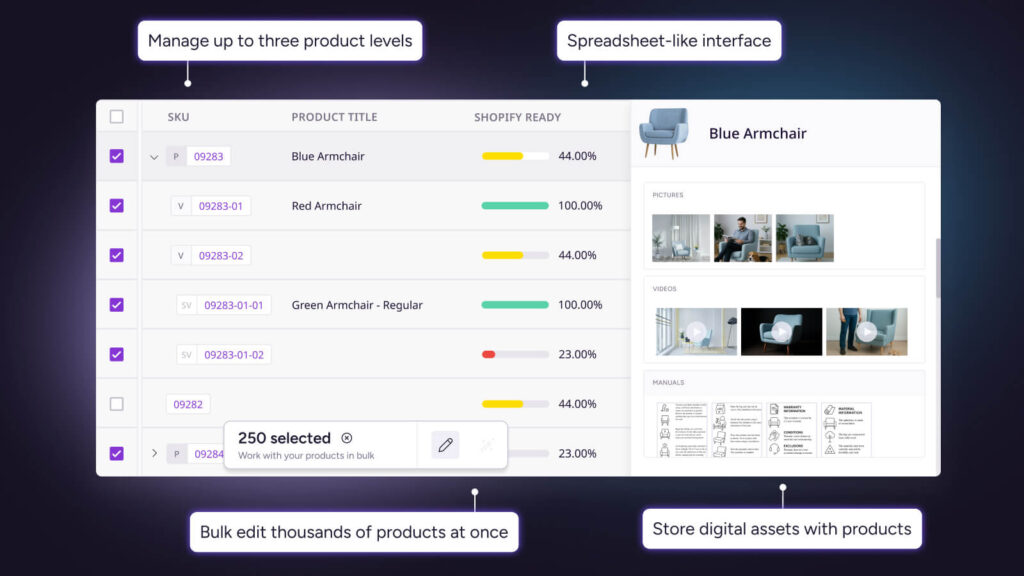
Plytix is the only PIM in this comparison with a native App Store integration, a free plan, and self-service setup that gets you live with your actual catalog on day one. Because it lives inside Shopify's ecosystem, the integration adapts as Shopify releases API updates automatically.
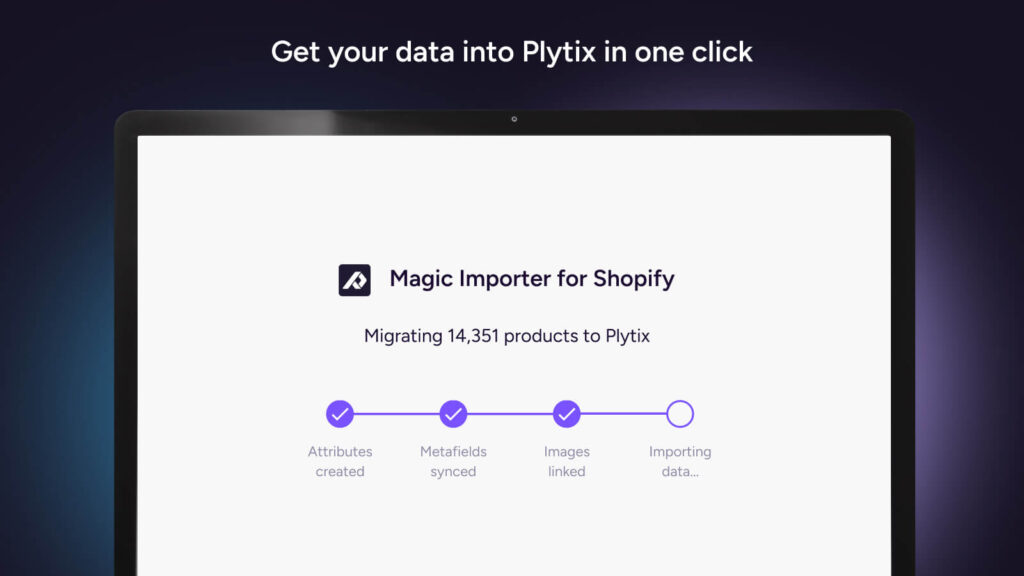
The Plytix Magic Importer detects your Shopify store structure and pulls products in automatically. From there, teams can bulk edit products, check catalog completeness before publishing, and apply automation rules without exporting a CSV or writing a line of code.
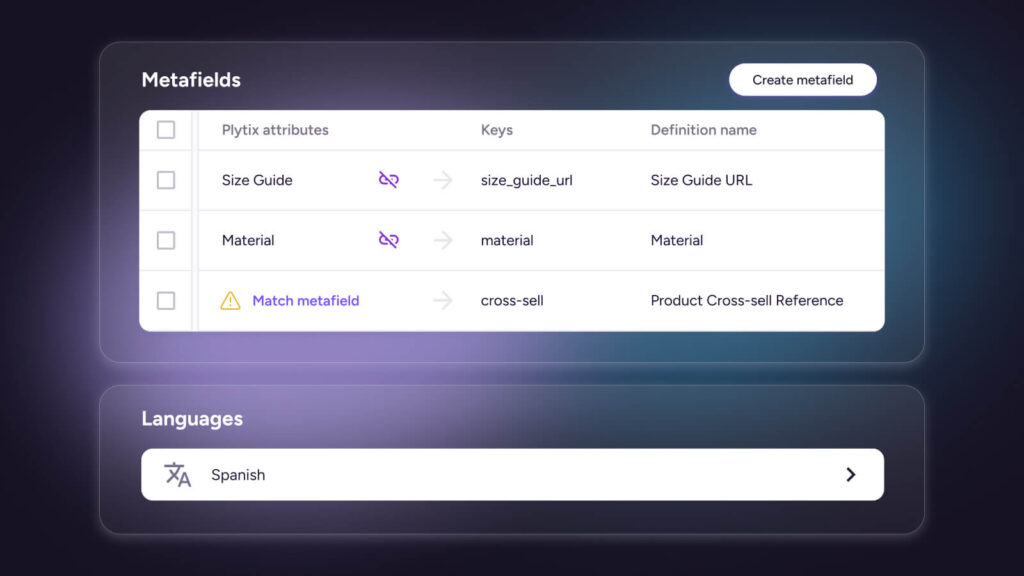
For Shopify Plus merchants running multiple stores, multistore management is the core differentiator. One workspace manages product information across storefronts while mapping to Shopify fields and metafields for each destination individually.
"We have been using Plytix with integrations for multiple Shopify stores and marketplaces and have found it to be a market leading PIM. The bulk actions tools massively improve efficiency and allow rules to run on any field... tasks we would have previously needed to rely on our development resource or Shopify flows can now be added with minimal technical knowledge."
— Bigjigs Toys, United Kingdom (Shopify App Store)
Merchants with extremely complex data models, 100K+ SKUs, or highly customized enterprise governance requirements may find Akeneo or Pimberly better suited to that scale.
Try Plytix free with your real catalog. No setup fees, no developer, no demo call required.
Sales Layer
Best for: Manufacturers and distributors managing product catalogs across Shopify, marketplaces, retailers, and wholesale channels.
Native Shopify App Store app.
Setup time
Guided onboarding, typically one to two weeks.
- Standard product fields and multichannel distribution workflows
- Localization is secondary to general multichannel distribution, not Shopify Markets-specific
- Approximately $12,000+
- No public pricing; requires a sales conversation
- Listed on the Shopify App Store with no reviews
- 4.6/5 on G2 (326 verified reviews)
No.
Sales Layer is strongest for product data onboarding, catalog quality management, and distributing structured product information across multiple channels at once. It supports data imports from spreadsheets and ERP exports, product completeness reporting, and maintaining catalog accuracy across diverse destinations.
Built primarily for multichannel product distribution rather than Shopify-specific workflows. Merchants whose primary need is deep Shopify feature support, advanced metafield management, Shopify Markets localization, or Shopify-first content enrichment may find its feature set less specialized for their use case.
Pimberly
Best for: Enterprise brands with complex catalogs, multiple product lines, and teams that need PIM and DAM capabilities in one platform.
Native Shopify App Store app
Weeks, with specialist-assisted onboarding.
- Standard product fields, with strong digital asset management built in
- Multi-store connections available
- Combined PIM and DAM architecture for complex media needs
- Approximately $36,000+
- Custom enterprise pricing
- 5.0/5 on the Shopify App Store (3 reviews)
- 4.4/5 on G2 (235 verified reviews)
No.
Pimberly is strongest for complex data structures, digital asset management, workflow automation, and enterprise-scale product operations. For organizations where product content and media management are tightly connected, the combined PIM and DAM is a meaningful advantage over standalone PIM tools.
Designed for organizations with complex implementation needs. The setup process, cost, and reliance on implementation support make it a heavier investment for merchants looking for a faster, Shopify-focused rollout.
Quable
Best for: Global brands that need multilingual product content, localization workflows, and structured product information management across international markets.
Native Shopify App Store app.
Weeks, with implementation support.
- Strong multilingual content management and localization workflows
- Shopify Markets support built into the platform
- Approximately $21,000+
- Custom pricing
- 5.0/5 on the Shopify App Store (1 review)
- 4.4/5 on G2 (153 verified reviews)
No.
Quable is strongest for multilingual content management, localization workflows, and coordinating product information across languages, regions, and channels. For brands managing distinct product content for different markets, its localization infrastructure is a clear differentiator.
Optimized for global brands with complex localization requirements. Shopify merchants with simpler catalogs, or whose primary focus is Shopify-native workflows rather than international market management, may not need its enterprise-level localization infrastructure.
Akeneo
Best for: Enterprise merchants with large catalogs, complex attribute requirements, and dedicated internal resources for implementation and ongoing management.
Native app available on the Shopify App Store, plus third-party connectors from implementation partners. Support for advanced Shopify features depends on which connector is in use.
Partner-led implementation, typically several months.
- Deep product data modeling and governance at enterprise scale
- Advanced Shopify metafield support including reference fields and MetaObjects
- Approximately $35,000+
- Enterprise pricing; custom quote required
- 5.0/5 on the Shopify App Store (1 review)
- 4.4/5 on G2 (230 verified reviews)
No.
Akeneo is strongest for product data governance, complex catalog modeling, and enterprise scalability. Its ecosystem of implementation partners makes it a common choice for organizations that need structured workflows, advanced attribute management, and long-term product information governance at significant scale.
The implementation timeline, partner involvement, and total year-one cost make it a significant investment relative to Shopify-focused options. The quality of the Shopify integration depends heavily on which connector and partner your organization uses.
Pimcore
Best for: Companies with in-house development teams that need complete control over their product data infrastructure and are willing to build and maintain a custom Shopify integration.
Third-party connectors only. No official Shopify app.
Developer-led implementation; timeline varies by build complexity and team capacity.
- Fully customizable by a development team
- Advanced metafield types and multi-store workflows can be built, but require custom integration
- No out-of-the-box Shopify workflow
- Approximately $20,000+, though this varies widely by development scope
- The software itself is free as open source; real costs are development, hosting, and ongoing maintenance
- No official Shopify App Store presence
- 4.5/5 on G2 (49 verified reviews)
The open-source version is free to download, but getting it live requires a development team. There is no self-service trial.
Pimcore's advantage is customization. Development teams can build highly specific data models, workflows, integrations, and user experiences around their own technical architecture. It suits custom ecommerce builds, headless architectures, and organizations that want full ownership of their technology stack.
Requires technical resources to implement, customize, and maintain. For Shopify merchants without a dedicated engineering team, this is not a self-service option.
There’s no single best PIM for every Shopify merchant. The right choice depends on what you’re trying to solve: managing multiple stores, selling across channels, handling enterprise complexity, or building a highly customized stack.
Best PIM for Shopify by use case
| Use case | Best PIM | Why |
|---|---|---|
| By Shopify setup | ||
| Shopify and Shopify Plus merchants | Plytix | Native Shopify App Store integration, multistore management, bulk editing, and fast setup without enterprise complexity |
| Multiple Shopify stores and markets | Plytix | Manage product information across storefronts from one catalog while adapting content for each destination |
| Shopify plus marketplaces, retailers, and wholesale channels | Sales Layer | Strong multichannel distribution workflows for brands managing product information across many destinations |
| By business complexity | ||
| Growing and mid-market Shopify brands | Plytix | Enterprise-grade product workflows with transparent pricing, quick setup, and no long implementation project |
| Enterprise catalogs and complex product governance | Akeneo | Deep product modeling, governance workflows, and a large implementation partner ecosystem |
| Enterprise PIM + DAM requirements | Pimberly | Combines product information and digital asset management for complex product operations |
| By global ecommerce needs | ||
| Multilingual and international brands | Quable | Strong localization workflows for teams managing product content across regions and languages |
| By technical requirements | ||
| Custom or headless Shopify builds | Pimcore | Maximum flexibility for teams that want to customize their data model, workflows, and architecture |
| Developer-led ecommerce infrastructure | Pimcore | Open-source platform that can be shaped around highly specific technical requirements |
| Best free PiM for Shopify | Plytix | Free plan and Shopify App Store integration let merchants import their catalog and explore a PIM workflow before investing |
Most PIM setups take weeks. Plytix takes a day.
Best PIM for Shopify Plus merchants
Shopify Plus merchants hit PIM territory faster than most. Multiple storefronts, B2B catalogs, and Shopify Markets all add complexity that a single admin panel wasn't built to handle.
Plytix is built for exactly this. Multistore management lets you update product content once and push it across every storefront. Shopify Markets support handles translation, localization, and currency differences by market.
For Shopify Plus brands that don't need enterprise-level governance at the scale of Akeneo or Pimberly, Plytix covers the same multistore and Markets complexity without the months-long implementation project.
Do I need a PIM for Shopify?
You need a PIM for Shopify when managing product information becomes too complex to handle directly in Shopify.
Shopify's built-in tools are great for smaller catalogs. But as your business grows, things get complicated fast. A PIM helps when you:
- Manage thousands of SKUs and bulk updates in Shopify become slow or difficult
- Sell through additional channels like Amazon, marketplaces, or wholesale portals
- Have multiple teams editing product information without a single source of truth
For Shopify Plus merchants, these challenges tend to show up all at once. B2B catalogs, Shopify Markets, and multistore setups mean more products, more channels, and more people who need accurate data. A PIM keeps it all from becoming a mess.
How to choose the right PIM for your Shopify store
Match it against six criteria: integration type, setup time, feature depth, cost, verified reviews, and free access to test with your own catalog. The checklist below walks through each one.
List the Shopify features your catalog actually uses
Advanced metafield types, MetaObjects, Shopify Markets, multiple storefronts. Write them down, then ask each vendor to confirm support in writing. This alone will cut your shortlist significantly.
Match the integration type to your technical resources
No dev team? You need a native App Store integration or a well-supported vendor connector. A platform that requires developer setup to maintain is not a self-service option, regardless of how it is described.
Set a realistic go-live timeline, not a sales estimate
Ask each vendor how long until your actual products are live in Shopify, not "typical onboarding." Same-day self-service, one to two weeks of guided setup, and months of partner-led rollout are three very different commitments to sign up for.
Get the full year-one cost before you see a demo
Ask for a complete cost estimate covering subscription, onboarding, setup, and partner fees before evaluating anything. License price and total cost are often very different numbers. See PIM software pricing for a breakdown of how tiers typically work.
Check App Store reviews, not just G2
G2 reviews measure overall PIM satisfaction across every use case a vendor serves. App Store reviews are written by Shopify merchants specifically, using the Shopify integration specifically, which is a closer read on how the tool will actually behave in your stack. If a vendor has no App Store reviews, treat that as a data gap, not a neutral sign.
Test with your real catalog, not sample data
Use any free plan or trial to import your actual Shopify products, map your real fields, and try your team's actual workflows. You will not know if a PIM fits until you are working with your own data.
Decide whether you actually need enterprise scale
If you need 100K+ SKUs, multi-region compliance, or a built-in DAM, Akeneo and Pimberly are built for it. If you have outgrown spreadsheets but do not need that level of complexity, those platforms will cost more and take longer than the problem warrants.
Which Shopify PIM should you choose?
There's no universal best PIM for every Shopify merchant. But for most brands selling through Shopify, Plytix is the strongest fit. It offers native Shopify integration, multistore management, and AI-powered content workflows. And you can get your product data in quickly, with no long-term commitment. With Magic Importer, merchants can connect their Shopify store and start working with their product data in Plytix without spreadsheet preparation or developer setup.
Akeneo and Pimberly are built for global enterprises with strict rules about who can change what, plus the IT resources to set that up. Sales Layer is the pick if your bigger challenge is distributing product information across B2B channels.
For everyone else, the best PIM is the one that helps your team spend less time maintaining product data and more time improving the customer experience.
"For Shopify brands doing $500K to $5M that sell across multiple channels, Plytix is the PIM I would point you to first, because it delivers the core benefit of a central catalog without the cost and complexity that make Akeneo a project rather than a tool."
— Steve Hutt, Host, eCommerce Fastlane Podcast
Frequently Asked Questions
No, Shopify does not have a built-in PIM. It gives you product fields, metafields, and media management, which works fine for smaller catalogs. But it does not validate data, handle bulk editing well, or push product content to other channels. That’s why a PIM for Shopify becomes useful once your catalog outgrows what Shopify’s native tools can handle.
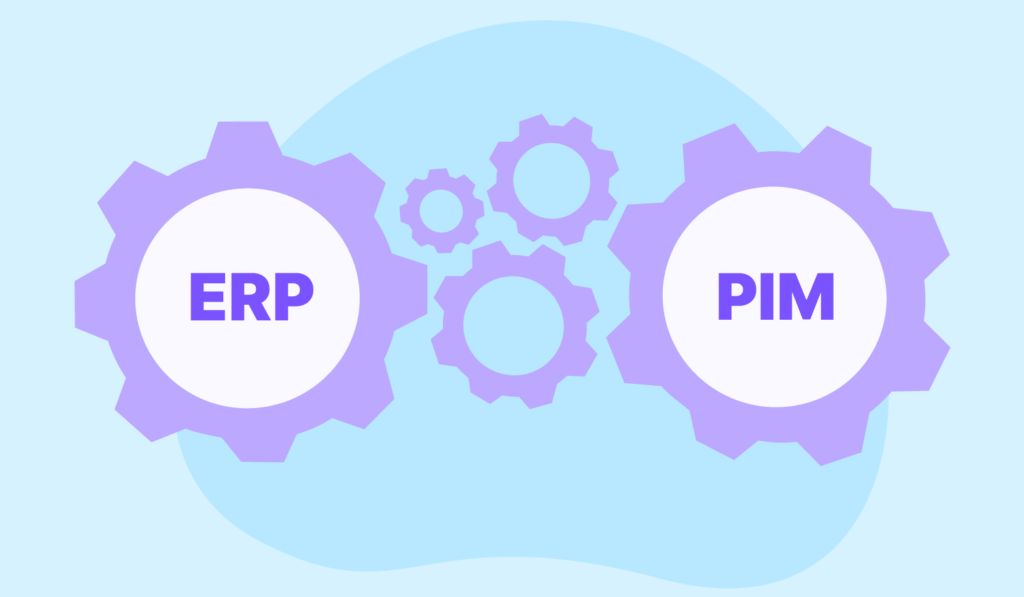
A PIM manages product content and an ERP manages business operations. Your ERP tracks inventory, orders, and finances. Your PIM manages descriptions, images, and specs. Think of it this way: the ERP tells Shopify how much stock you have, and the PIM tells Shopify what the product actually is.
No, Shopify is not a PIM system. It is an ecommerce platform that stores product fields and media for your storefront. It does not validate content completeness, manage product data across teams, or distribute different versions to different channels. A PIM handles that layer.
Yes, most Shopify PIMs can manage metafields. Standard types like text, numbers, dates, and rich text are broadly supported. Plytix also supports advanced types like product references, variant references, and file references. For Sales Layer, Pimberly, and Quable, ask the vendor directly about advanced metafield support before you commit.
No, Matrixify does not replace a PIM. Matrixify moves data in and out of Shopify. A PIM is where your team manages, enriches, and validates that data on an ongoing basis. They solve different problems, and a lot of merchants use both.
Yes, spreadsheets work fine for small catalogs. Once you are managing hundreds of SKUs across multiple channels or stores, they become the problem: version control breaks down, errors creep in, and updates take forever. A PIM handles that coordination automatically.
Yes, Matrixify and a PIM work well together. Matrixify is great for bulk imports, exports, and one-off migrations. A PIM is the ongoing system your team works in day to day. They complement each other rather than compete.
It depends on what your MetaObjects are doing. If they exist mainly to store structured product attributes like materials or colorways, a PIM often covers that already and you may need fewer of them. If they are handling relational data on your storefront, those stay in Shopify. Not sure which is which? Worth talking to a specialist before you restructure anything.