Think about the last thing you bought online. You probably read the details to be sure it was what you wanted, then looked at the photos to see what you'd actually get.
Shoppers need both to be right, and behind the scenes, that's two different jobs: keeping product information accurate, and keeping product visuals organized and on-brand.
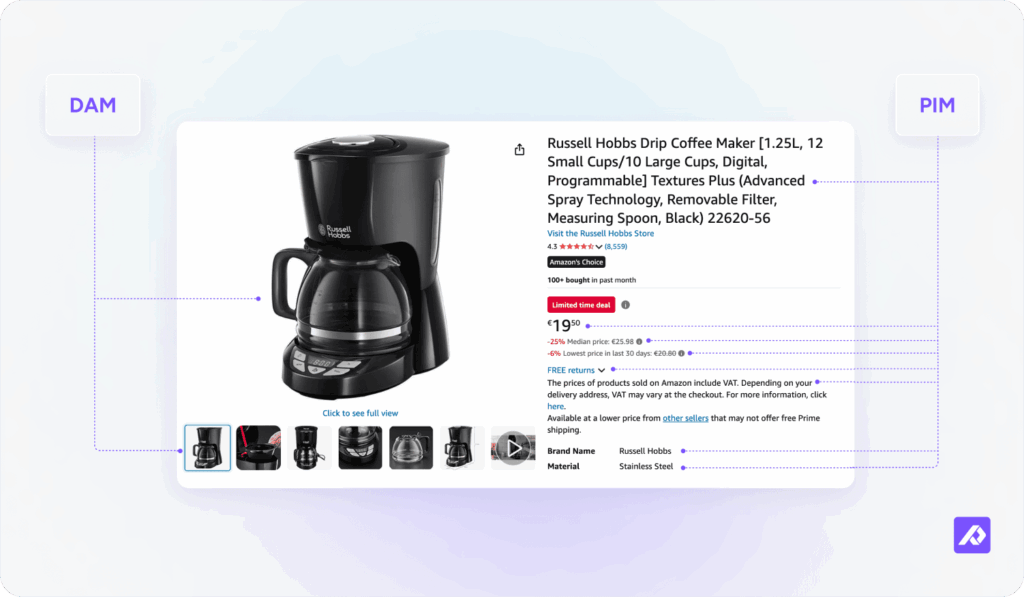
Product information management (PIM) and digital asset management (DAM) software each handle one of them. PIM DAM solutions range from a single native platform to two tools connected by an API, but either way the goal is the same: data and assets that always match.
What is PIM and what is DAM?
What is PIM?
PIM (product information management) is software that centralizes, enriches, and distributes structured product data (descriptions, specs, pricing, and SKUs) so every channel you sell on pulls from one accurate source instead of scattered spreadsheets and Slack threads.
Here's what a PIM does:
- Centralizes it: every product detail lives in one place, not scattered across spreadsheets, inboxes, and someone’s memory.
- Enriches it: you fill missing fields and fix thin descriptions, so nothing ships half-finished.
- Validates it: built-in rules catch errors like a wrong price or a missing size before a shopper sees them.
- Distributes it: updates sync to every channel automatically, so you never paste the same change twice.
For the full picture, read what is PIM software.
What is DAM?
DAM (digital asset management) is software that centralizes, organizes, and distributes your media files (product photos, videos, spec sheets, and brand documents) so the right, approved asset is always one search away instead of buried in a shared drive.
Here's what a DAM does:
- Centralizes it: every photo, video, and document sits in one library, not across hard drives, inboxes, and cloud folders.
- Organizes it: categories and metadata let anyone search by product, season, or file type instead of guessing where it was saved.
- Controls versions: the approved, current file is always obvious, so nobody ships last year’s photo by accident. A good DAM also works from one high-resolution master, with tools to reformat, resize, or adjust it for each channel from there.
- Distributes it: approved assets sync to every channel and team that needs them, automatically.
For the full picture, read what is DAM software.
PIM vs DAM: What is the difference between PIM and DAM?
The core difference is that PIM manages structured data (the facts about a product) while DAM manages files (the media that shows it). One tells the story in words and numbers; the other shows it in images and video.
| Capability | PIM | DAM |
|---|---|---|
| Stores what | Attributes, specs, pricing, copy | Photos, videos, PDFs, documents |
| Primary user | Product and ecommerce teams | Marketing and creative teams |
| Main job | Keep product data accurate everywhere you sell | Keep the right, on-brand file easy to find |
| Output | Structured data fields and channel-ready listings | Media files formatted for each destination |
| Connects to | Channels, marketplaces, ERPs, feeds | Channels, creative tools, brand portals |
| Updated by | Product managers, data teams | Creative and marketing teams |
| Data type | Structured (text, numbers, attributes) | Binary files (images, video, audio, PDFs) |
| Works without the other | Yes, but listings ship without visuals | Yes, but assets have no product context |
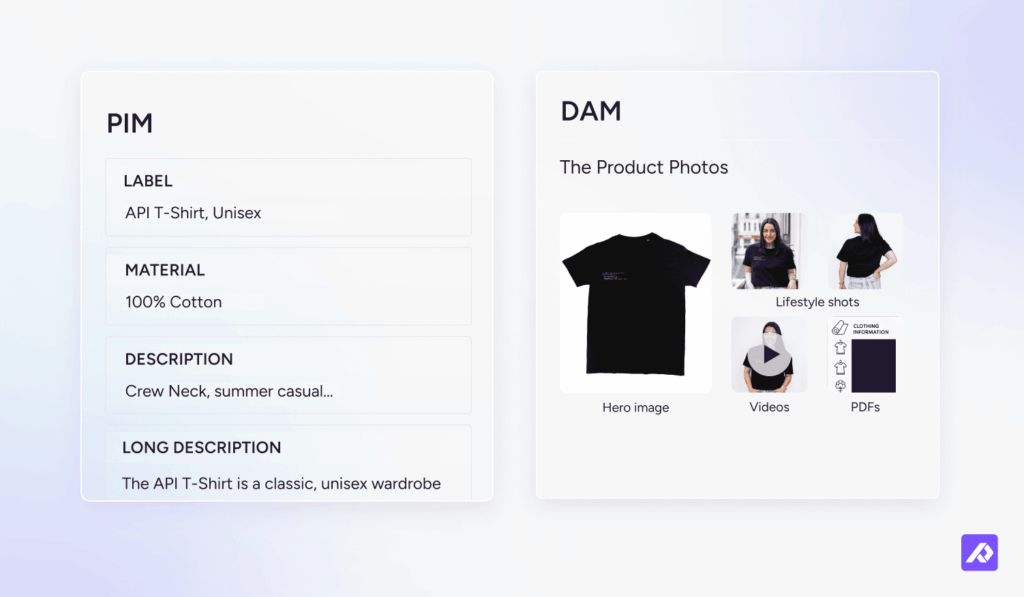
Notice how little overlap there is. That's the real reason teams end up needing both, not choosing between them. Some PIM tools store a few basic images, and most DAM tools hold a few basic fields, but neither one replaces the other.
Do you need PIM, DAM, or both?
The answer for most ecommerce teams is both, but there are situations where one is the right starting point.
When PIM alone is enough
If your catalog is data-heavy but your visual output is limited, a PIM covers most of the job. B2B manufacturers selling to procurement buyers, for example, often have hundreds of SKUs with detailed specs but fewer than 50 unique assets across the entire catalog. A dedicated DAM adds overhead without solving a real problem at that scale.
When DAM alone is enough
If you're managing large volumes of creative assets without complex product data, a DAM covers the job. Think agencies, media companies, or brand teams producing content independently of a product catalog. The signal is that your work revolves around campaigns and deliverables, not SKUs with specs and prices.
When you need both
If you're running multichannel ecommerce, managing more than 1,000 SKUs, or syndicating to three or more channels, you need both. The bottleneck isn't the data or the assets individually: it's keeping them matched, current, and channel-ready at scale.
Plytix's 2026 Commerce Benchmarks measured exactly how much it takes to launch 100 SKUs across every channel, by catalog size:
| Catalog size | Hours to launch 100 SKUs | Cost per launch (at $21/hr) |
|---|---|---|
| Under 1,000 SKUs | 30-80 hours | $630-$1,680 |
| 1,000-10,000 SKUs | 40-100 hours | $840-$2,100 |
| 10,000-100,000 SKUs | 60-150 hours | $1,260-$3,150 |
Most of those hours don't go to writing the data or shooting the photos. They go to matching the two: finding the right image for the right SKU, hunting for the current version, and fixing what fell out of sync. Connect product data and the assets, and that time drops.
What is a PIM DAM system and how does it work?
A PIM DAM system is a setup where product data management and digital asset management work together, either through two tools connected by an integration or through one platform that includes both from the start.
Take a running shoe that comes in five colors, about to go live. The PIM has the size chart, materials, and price for every color. The DAM has the photo and video for each one. But the blue listing is still pointing at last month's red photo, and since the price and size check out, it ships anyway. The shopper orders blue and gets red.
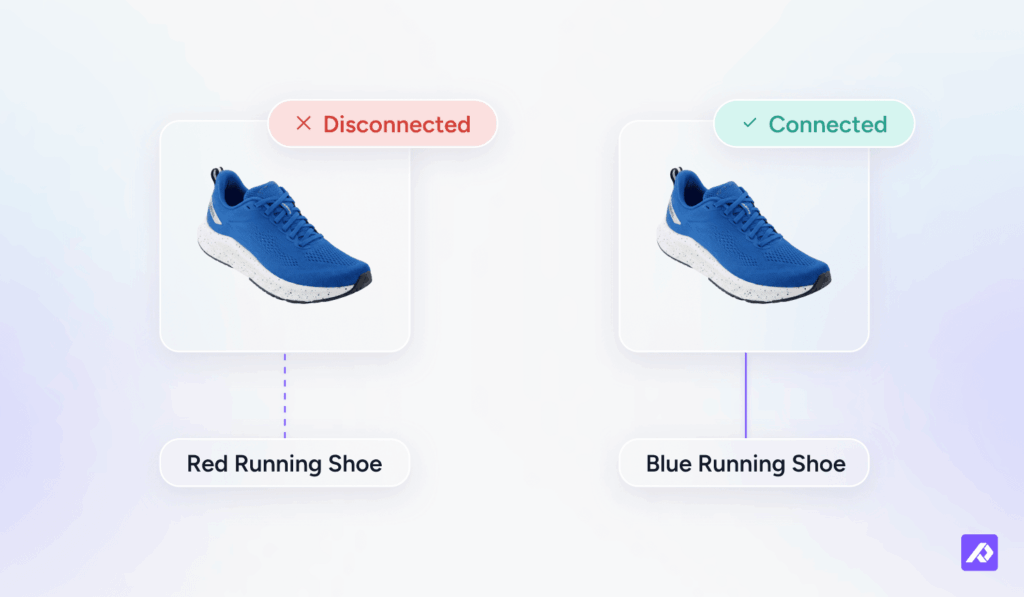
Nothing about the data was wrong. The link between the data and the image was. A connected PIM DAM system closes that link automatically, for every product and every channel.
How PIM and DAM integration works
Here is how product data and assets move through a connected PIM DAM system, from the moment a record is created to the moment it goes live on every channel:
- Product record creation. Attributes, specs, copy, and pricing are entered and validated in one place.
- Asset upload. Photos, videos, and documents are added to the product record, either at the same time as the data or later.
- Product-to-asset linking. Each product record points to its own set of approved photos, videos, and documents, so the right file always shows up in the right place.
- Shared completeness rules. A product isn’t “done” until its data fields and its assets are both filled in, not just one or the other.
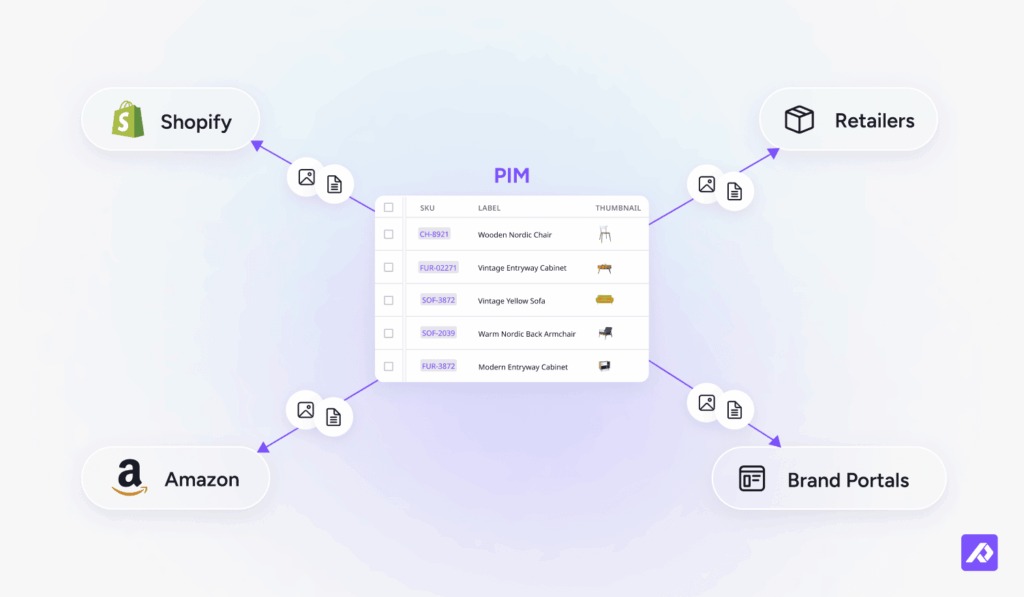
- Feed and channel readiness. When a listing goes out to Shopify, Amazon, or a retailer, the data and the assets travel together, formatted the way that channel needs.
- One update, everywhere. Change a product’s data or swap in a new photo, and every channel it feeds gets the update automatically.
Benefits of connecting PIM and DAM
"The most successful ecommerce companies of the next decade won't be the ones with the best websites or the biggest marketing budgets. They'll be the ones whose product information is so comprehensive, so accurate, and so well-structured that AI systems consistently choose them over competitors. It's not about being pretty anymore. It's about being right."
— Morten Poulsen, CEO and Co-Founder, Plytix
Consistent brand across every channel
When PIM and DAM are connected, every channel pulls the same approved data and the same approved assets. As Shopify notes, a mismatch between a product and its online description or images is one of the top reasons customers return orders. Consistent data and consistent visuals, linked at the product level, close that gap before the order ships.
Faster product launches
When product data and assets live in the same system, nothing waits on the other team. According to Plytix's 2026 Commerce Benchmarks, disconnected teams spend 30-150 hours per 100 SKUs on matching data to assets, not creating them. A connected system removes that manual matching and re-export work entirely.
AI-optimized images per channel
A connected PIM DAM system uses AI to optimize and enhance product images for each channel's requirements automatically. One source image gets prepared for Amazon, Shopify, print, and retail partners without manual resizing or reformatting. Better images across more channels, with less work.
Less manual work no matter your catalog size
Without a connection, someone manually matches assets to product records, checks that the right variant photo is linked to the right SKU, and re-exports whenever either side changes. That work scales linearly with catalog size. A connected system makes it automatic: asset assignments travel with the product record, and updates push to every downstream channel in one step.
Compliance and governance
In B2B and regulated industries, product compliance increasingly depends on keeping data and assets synchronized. The EU's Digital Product Passport (DPP) regulation, for example, will require brands to maintain a verified link between product specifications and supporting documentation. A native or tightly integrated PIM DAM system makes that link auditable by design, rather than something someone has to manually check.
Scalable as the catalog grows
Manual workflows that work at 200 SKUs break at 2,000. Connected PIM DAM systems handle catalog growth without a proportional increase in coordination work, so product launches stay predictable regardless of volume.
How do you set up a PIM DAM system?
The right setup depends on what tools you already have and how much integration work you want to take on. Four options, each with a different cost and complexity:
| Setup | What it is | Costs | Benefits |
|---|---|---|---|
| Native | PIM and DAM built into one platform | One subscription | No integration to build or maintain; shared data layer; fastest to deploy |
| Connector / Custom API | Two separate tools linked by a pre-built or custom API | Two subscriptions plus integration upkeep | Keep existing tools; flexibility in choosing each |
| Middleware / iPaaS | A third platform (such as Zapier, Boomi, or MuleSoft) brokering the connection between two tools | Two subscriptions plus middleware license; highest maintenance of the four | Most flexible for complex, multi-system workflows |
| Manual | Export from one tool, upload to the other | Staff time per update | No setup cost; works for very small catalogs |
The native option removes the integration step entirely, because there's nothing to sync in the first place. The manual option works too, but it's usually the first thing to break down as a catalog grows.
One tool for your product content.
Less to set up. Less to maintain.
A real example of PIM and DAM working together
Before Plytix, sharing product content with a new retail partner looked like this for Alltrade Tools: track down product data scattered across multiple spreadsheets, identify the right version of each photo from a folder full of near-identical files, manually match 800 SKUs' worth of data to 800 SKUs' worth of images, then format and submit everything to the retailer's specifications.
Time from start to submission: one full month.
On Plytix, with product data and product assets in the same place and already linked at the SKU level, the same task takes 20 minutes.
That's what happens when the matching step disappears: a month becomes 20 minutes on 800 SKUs. The data doesn't need to be chased. The assets don't need to be matched. The export formats itself for the partner's requirements. The job becomes submitting the catalog, not assembling it first.
Plytix is built so product data and product assets share one place from the start, not bolted together after the fact.
Choosing a PIM DAM solution
For most ecommerce teams, the right choice links product data and assets to the exact SKU, and removes the matching work entirely. Not just a system that stores both in the same general area. These five questions help you tell the difference:
- Does product-to-asset linking happen at the record level?
Look for each product record pointing to its own approved set of files, not assets sitting in a shared folder loosely associated with a product category. The link has to be SKU-specific. - Does it push complete listings to every channel?
It should format and distribute data and assets together, matched to each channel’s requirements. A system that just exports a feed you manually submit doesn’t remove the matching work. - What does total cost of ownership look like?
Two tools mean two subscriptions, two onboarding processes, and an integration to build, monitor, and update every time either platform ships changes. Factor that in before comparing list prices. - How does version control work on assets?
The right asset has to be obviously findable for every product. Look for version history, approval workflows, and a clear way to see which asset is live versus archived. - Is PIM and DAM native, or bolted together?
A native platform removes the integration layer entirely. A connector-based setup can work well, but it’s one more system to maintain, and the first thing that breaks when catalog volume grows.
For most small and mid-sized ecommerce teams, one platform beats two connected tools on cost, setup, and upkeep. Teams already locked into a specific PIM or DAM sometimes prefer to connect what they have. Compare Plytix PIM and Plytix DAM if you're weighing a single-platform option.
Frequently Asked Questions
A PIM DAM system is a setup where product information management and digital asset management work together, so product data and product assets stay linked and up to date across every channel a product ships to.
PIM manages structured product data, like specs, pricing, and descriptions. DAM manages digital files, like photos and videos. They solve related but different problems, and most product pages depend on both being accurate.
Most ecommerce and product teams do. Product pages need accurate data and the correct visuals to convert, and each system only covers one half of that job. A small catalog might get by on one tool for a while, but that usually changes as the product count grows.
A PIM manages structured product data (specs, pricing, attributes). A DAM manages media files (photos, videos, documents). A CMS (content management system) manages published web content: pages, blogs, and layouts. In ecommerce, all three often run in parallel: PIM feeds the product data, DAM supplies the assets, and the CMS assembles them into the storefront.
PIM (product information management) manages data specific to products: SKUs, specs, descriptions. DAM (digital asset management) manages media files. MDM (master data management) is a broader enterprise discipline covering all critical data across a business: customers, suppliers, financials, and products. PIM is often a specialized application of MDM focused specifically on the product domain.This is the answer
Start with whichever is your current bottleneck. If product data is inconsistent across channels (wrong specs, missing fields, pricing errors) PIM is the priority. If the problem is asset chaos (teams can’t find approved files, outdated images ship, version control is manual) start with DAM. A native platform like Plytix lets you use both from day one without having to choose.
They connect through a built-in connector, a custom API, a middleware platform, or, in native solutions like Plytix, through a single system that includes both without a separate integration step. The right choice depends on whether you’re starting fresh or already committed to one of the two tools. See “How PIM and DAM integration works” above for the step-by-step breakdown.
Some PIM tools can store basic product images, but they usually lack the version control and advanced search a dedicated DAM provides. That’s fine for a small asset library, but it gets harder to manage as the number of files grows.
Not usually. DAM software is built for files and media, not structured data like SKUs, pricing, or technical specifications. Most DAM tools can hold a few basic fields, but they’re not designed to be a product’s single source of truth.
It depends on the platform. Some PIM tools, including Plytix, include DAM features built in. Others require a separate DAM tool connected through an integration, which adds a step most teams would rather skip.